
Gogs Credential Leaks and Vault SSH OTP — From Git History to Root
A technical deep dive into two attack surfaces that chain together: how Git history preserves credentials that were supposedly deleted, and how a misconfigured HashiCorp Vault SSH OTP engine turns a low-privileged token into root access.
The premise
Two techniques that look unrelated on the surface — a credential leak buried in Git history and a secrets engine built into HashiCorp Vault — chained together into a full system compromise. Neither is exotic. Neither requires a zero-day. Both are documented misconfigurations with well-understood fixes, and both appear in real environments more often than they should.
The first technique exploits a mental model that almost every developer shares: that removing a secret from the latest commit removes it from the repository. The second exploits an operational shortcut that almost every Vault deployment takes at some point: leaving a root token on disk “just for now.” Separately, each is a known issue. Together, they turn a low-privileged foothold into full root access.
This article breaks down how each technique works, why it works, and how they combine. The full penetration test that used this chain is documented here: Credential Chain Compromise →.
Part One — Git History Is Permanent
The mental model that gets people in trouble
When developers commit a secret to a repository and then remove it in a later commit, most of them believe the secret is gone. The file no longer contains the password, git log on the current branch doesn’t show it, and the working tree is clean. Problem solved, right?
Wrong. Git is a content-addressable filesystem with an append-only history model. Every commit is an immutable snapshot. Every blob of content — including the version of test.py that had the password in it — is stored permanently in the object database. When you “remove” a secret in a new commit, you’re not deleting the old blob; you’re adding a new commit that points to a new blob. The old blob is still there.
commit A  →  test.py (v1, with password)
commit B  →  test.py (v2, password replaced by env var)
             ↑ both blobs exist in .git/objects/
Anyone with read access to the repository can recover v1 at any time:
git log --all --full-history -- test.py
git show <commit-A>:test.py
This is not a bug in Git. It’s the fundamental property that makes Git useful. But it means that once a secret is committed, it is compromised forever — regardless of how quickly you remove it.
How attackers find leaked credentials
The manual approach is what the tester did in this assessment: browse the repository’s commit history through the Gogs web interface, look for changes to configuration files, test scripts, and anything that might have contained credentials.
The automated approach is to run a secret scanner over the entire history. The three most common tools:
trufflehog — scans Git history for high-entropy strings and known credential patterns. Supports GitHub, GitLab, Gogs, and local repositories.
trufflehog git https://gogs.craft.htb/craft/craft-api.git --only-verifiedgitleaks — regex-based scanner with a large default ruleset for AWS keys, GCP credentials, private keys, database URLs, and generic secrets.
gitleaks detect --source . --log-opts="--all"git-secrets — originally from AWS Labs, works as a pre-commit hook to block commits that match a set of patterns.
git secrets --scan-historyIn this assessment, the leak was a hardcoded username and password pair in a Python test file:
response = requests.get('https://api.craft.htb/api/auth/login',
  auth=('dinesh', '4aUh0A8PbVJxgd'), verify=False)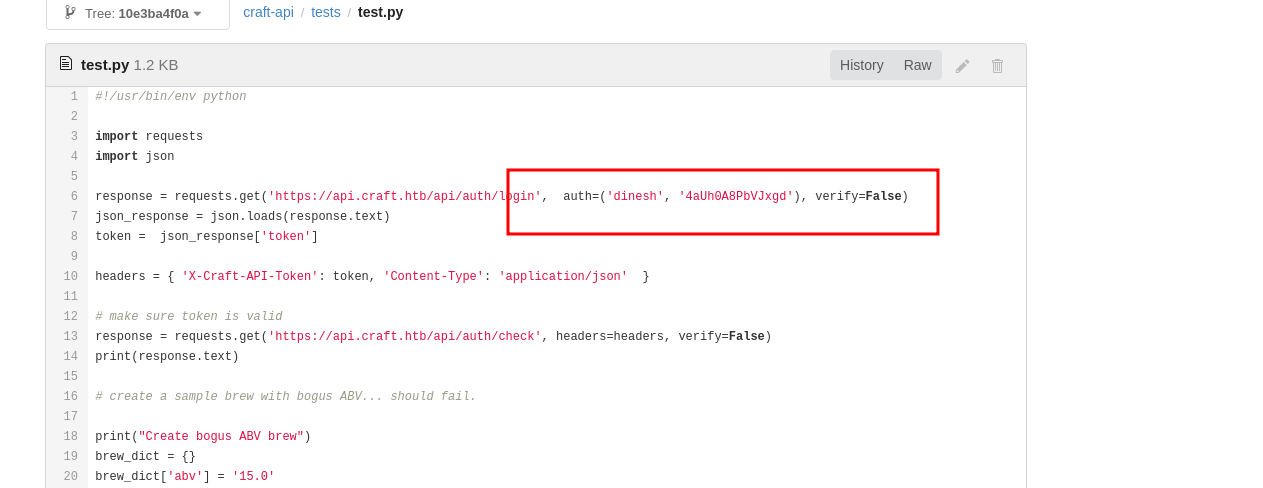
That single line — removed in a subsequent commit but preserved in history — was the entry point for the entire attack chain.
Why Gogs specifically
Gogs (Go Git Service) is a lightweight self-hosted Git service, popular in small-to-medium environments because it’s a single binary with minimal dependencies. It exposes a web interface very similar to GitHub’s:
- Repository browsing by branch and commit
- Commit history per file
- Diff viewer
- Raw file access
- Public and private repository visibility
The security implication is that any repository marked as public is fully readable by anyone who can reach the Gogs instance. And even private repositories become readable once a low-privileged credential is obtained.
Gogs has had its own set of vulnerabilities over the years, but in this assessment the issue wasn’t a Gogs vulnerability — it was how the developers used Gogs. They treated “delete the secret and commit” as equivalent to “the secret is gone.” It isn’t.
What “fixing” a leaked credential actually requires
If a credential has ever been committed to a repository, the remediation is not “remove it from the latest commit.” The remediation is:
- Rotate the credential immediately. The old value must be considered compromised from the moment it was pushed.
- Assume the repository has been cloned by an attacker. Even if the repository is private, any collaborator or compromised account could have pulled the full history.
- Audit all other secrets in the same repository. If one credential leaked, others probably did too.
- Add preventive tooling.
git-secrets,gitleaks, ortrufflehogas a pre-commit hook or CI check. - Consider history rewriting (
git filter-repoor BFG Repo-Cleaner) — but only after step 1.
The order matters. Rotating the credential is the only step that actually mitigates the risk.
Part Two — HashiCorp Vault: Architecture and the Root Token Problem
What Vault is
HashiCorp Vault is a secrets management system. Its core purpose is to centralize the storage, access control, and lifecycle management of sensitive data — database credentials, API keys, TLS certificates, SSH keys, cloud provider tokens, and anything else that shouldn’t live in plaintext.
The architecture has three main concepts:
Secrets engines are the components that store and generate secrets:
kv/— key-value store for static secretsdatabase/— dynamic database credentials with automatic rotationpki/— certificate authority for issuing TLS certificatesssh/— SSH certificate signing and OTP generationtransit/— encryption as a serviceaws/,gcp/,azure/— dynamic cloud credentials
Auth methods are the ways clients authenticate to Vault:
token/— the default; clients authenticate with a tokenuserpass/— username and passwordldap/— LDAP or Active Directorykubernetes/— service account tokensaws/,gcp/,azure/— cloud IAM identitiesoidc/— OpenID Connect
Policies define what an authenticated identity can do. A policy is a set of rules that grant or deny access to specific paths within Vault:
path "secret/data/craft-api/*" {
  capabilities = ["read", "list"]
}
The token hierarchy
When you authenticate to Vault, you receive a token. That token carries one or more policies, an optional TTL, and metadata about how it was created. Tokens can be:
- Root tokens — the most privileged. They have the
rootpolicy, which bypasses all policy checks and grants unrestricted access to every path in Vault. Root tokens cannot be created by non-root tokens; they must be generated during initial setup or by another root token. - Child tokens — created from an existing token, with a subset of its policies.
- Service tokens — long-lived tokens with a TTL.
- Batch tokens — short-lived, lightweight tokens suitable for high-volume workloads.
- Periodic tokens — tokens whose TTL can be extended indefinitely as long as they’re renewed.
The problem with root tokens is that they’re all-or-nothing. There’s no partial root. A root token can read every secret, modify every policy, disable every audit device, and issue new root tokens.
Why root tokens end up on disk
Vault’s documentation is explicit: root tokens should be used only for initial setup, and then revoked. The recommended workflow is:
- Initialize Vault (
vault operator init). - Use the root token to configure auth methods, secrets engines, policies, and audit devices.
- Create a new admin token with limited, explicit policies.
- Revoke the root token.
In practice, step 4 is often skipped. The root token gets written to a file — often ~/.vault-token, which is the default location the Vault CLI reads from — and left there.
In this assessment, that’s exactly what happened:
gilfoyle@craft:~$ cat .vault-token
f1783c8d-41c7-0b12-d1c1-cf2aa17ac6b9

gilfoyle@craft:~$ vault token lookup
Key                 Value
---                 -----
accessor            1dd7b9a1-f0f1-f230-dc76-46970deb5103
creation_time       1549678834
creation_ttl        0s
display_name        root
id                  f1783c8d-41c7-0b12-d1c1-cf2aa17ac6b9
orphan              true
path                auth/token/root
policies            [root]
ttl                 0s
Three things stand out in that output:
policies: [root]— this token has the root policy. Unrestricted access.creation_ttl: 0sandttl: 0s— this token never expires.orphan: true— this token has no parent, so revoking a parent token won’t affect it.
Together, they mean the token is effectively a permanent backdoor into every secret Vault manages.
What a root token can do
A root token can:
# List every secrets engine
vault secrets list

# Read every KV secret
vault kv get secret/any/path

# Disable audit logging (destroying evidence)
vault audit disable file/

# Create a new root token for persistence
vault token create -policy=root

# Modify policies to grant additional access
vault policy write my-policy -

# Read the Vault configuration
vault read sys/config/state/sanitized
In a production environment, a root token in the wrong hands is not just “access to secrets” — it’s the ability to redefine the entire trust model of the secrets management system.
Part Three — The Vault SSH Secrets Engine (OTP Mode)
Two modes, two very different threat models
Vault’s SSH secrets engine has two modes:
Signed SSH certificates. Vault acts as a certificate authority. When a client requests access, Vault signs the client’s SSH public key with a short-lived certificate. The target host trusts the CA’s public key, and the client authenticates with the signed certificate. The private key never leaves the client. The certificate has a TTL, so access expires automatically.
One-time passwords (OTP). Vault generates a short-lived password on demand. The client requests an OTP for a specific user and IP, Vault returns a password, and the client uses it to authenticate. The target host must have vault-ssh-helper installed and configured to validate OTPs against Vault.
This assessment used OTP mode.
How the OTP flow works
From the client’s perspective:
vault write ssh/creds/root_otp ip=127.0.0.1Vault returns:
Key                Value
---                -----
ip                 127.0.0.1
key                7f0afe29-09e8-20f3-350e-1b49fbe0c02b
key_type           otp
port               22
username           root
The client then SSHes:
ssh root@127.0.0.1
Password: 7f0afe29-09e8-20f3-350e-1b49fbe0c02b
On the target host, vault-ssh-helper validates the OTP against Vault. If valid, the login succeeds and the OTP is consumed.
The role configuration is the security boundary
The critical configuration is the role:
vault write ssh/roles/root_otp \
  key_type=otp \
  default_user=root \
  allowed_users=root \
  cidr_list=0.0.0.0/0
That configuration says: anyone who can read this role can obtain an OTP for root on any IP.
The cidr_list parameter is meant to restrict which source IPs can request OTPs for a given target. Setting it to 0.0.0.0/0 means no restriction. Setting allowed_users=root means the OTP grants root access. And because the role can be read by anyone with a token that has read access to ssh/creds/root_otp, a root token is sufficient to obtain root.
The safe version would look like:
vault write ssh/roles/admin_otp \
  key_type=otp \
  default_user=admin \
  allowed_users=admin \
  cidr_list=10.0.0.0/8
Even better, use signed certificates instead of OTPs:
vault write ssh/roles/admin_signed \
  key_type=ca \
  allowed_users=admin \
  default_user=admin \
  ttl=5m \
  allowed_critical_options="" \
  allowed_extensions=""
The ttl=5m means any signed certificate is valid for five minutes.
Why OTP mode is dangerous in misconfigured environments
OTP mode has a specific failure mode that signed certificates don’t: the OTP is a plaintext password. It’s transmitted to the target host and validated by vault-ssh-helper. If the target host is compromised, the vault-ssh-helper configuration and the Vault token used for validation are also compromised.
In this chain, the sequence was:
- Obtain SSH access as
gilfoyle(via the leaked SSH key). - Find the Vault root token in
~/.vault-token. - Use the root token to read the SSH role and generate an OTP for
root. - SSH as
root.
Every step was enabled by a separate misconfiguration. Fixing any one of them would have broken the chain. But fixing the OTP role — restricting it to non-root users, or better, switching to signed certificates — would have been the most impactful single change.
Part Four — The Full Chain
- Gogs enumeration → public repository
craft-api→ commit history leaksdineshcredentials. - API authentication → JWT token obtained.
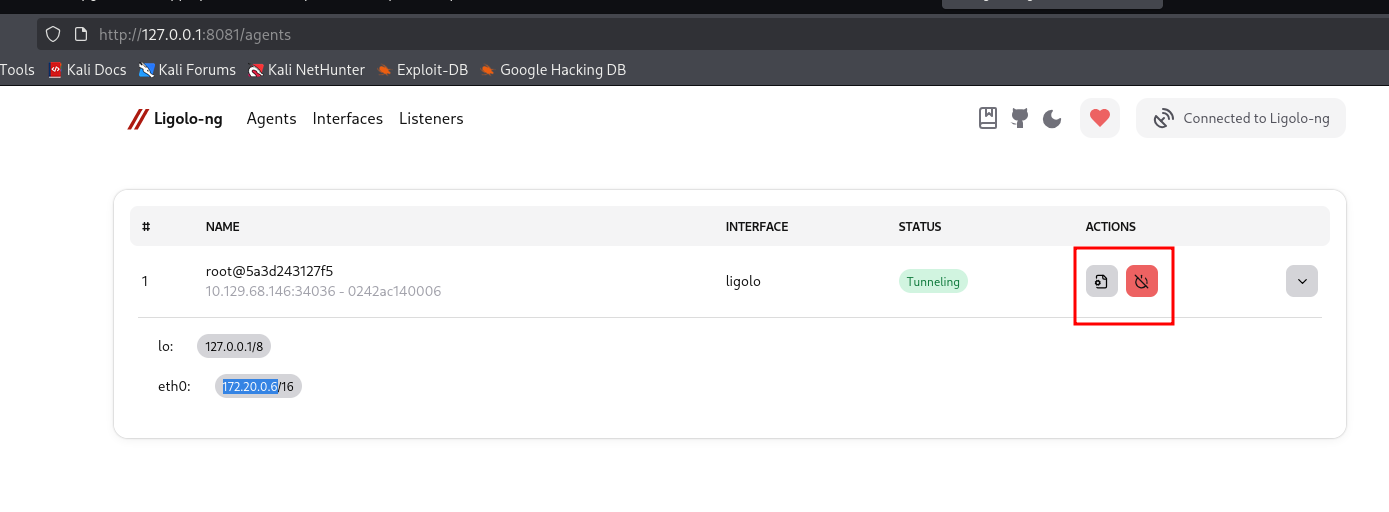
eval()injection → RCE inside a Docker container running asroot.- Container pivoting → Ligolo-ng tunnel to
172.20.0.0/16. - MySQL access → plaintext credentials in
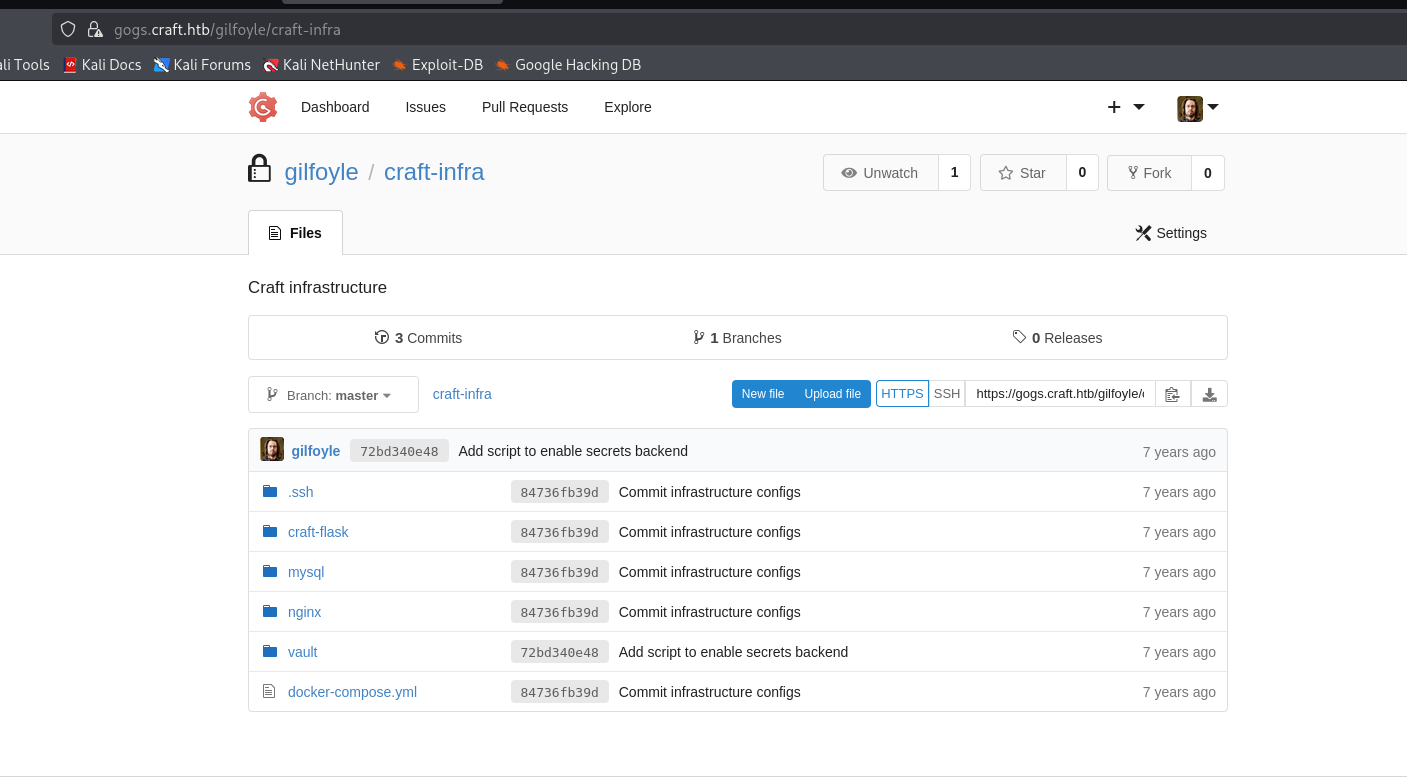
settings.py→ dump of theusertable revealsgilfoylepassword. - Gogs private repo →
craft-infracontains an SSH private key + passphrase. - SSH access as
gilfoyle→.vault-tokenfound in home directory. - Vault root token → enumerate secrets engines → SSH OTP engine mounted.
- OTP generation → one-time password for
root@127.0.0.1. - Root access → full system compromise.
The full penetration test report — with all five findings, CVSS scores, and remediation plan — is documented here: Credential Chain Compromise →.
Detection and Defense
Detecting leaked credentials in Git history
You can’t defend against what you don’t know you’re exposed to. The first step is finding every credential that’s ever been committed:
# trufflehog — scans full history, only reports verified secrets
trufflehog git file:///path/to/repo --only-verified

# gitleaks — fast, regex-based, large default ruleset
gitleaks detect --source /path/to/repo --log-opts="--all"

# git-secrets — AWS Labs tool, works well as a pre-commit hook
git secrets --scan-history
Integrate the same tools into CI as a pre-merge check:
# .github/workflows/secrets-scan.yml
name: Secrets Scan
on: [pull_request]
jobs:
  gitleaks:
    runs-on: ubuntu-latest
    steps:
      - uses: actions/checkout@v4
        with:
          fetch-depth: 0
      - uses: gitleaks/gitleaks-action@v2
The fetch-depth: 0 is important — by default, GitHub Actions does a shallow clone that doesn’t include full history, and gitleaks would miss everything older than the last commit.
Detecting Vault root token abuse
Vault’s audit device logs every request. If audit logging is enabled, you can query for suspicious token usage:
# Enable file audit device
vault audit enable file file_path=/var/log/vault_audit.log

# Search for root token usage
grep '"policy":"root"' /var/log/vault_audit.log
The audit log records the token accessor (not the token itself), the path accessed, the operation, and the response. Root token usage should be rare and expected — anything else is worth investigating.
Additional detections:
- Unexpected paths accessed — a low-privileged service token reading
ssh/creds/root_otpis a red flag. - OTP generation for privileged users — if your roles allow OTP generation for
rootoradmin, log every instance. - Root token creation events —
vault token create -policy=rootshould be rare and monitored. - Audit device modifications —
vault audit disableis a strong indicator of attempted evidence destruction.
Hardening the SSH secrets engine
If you must use OTP mode:
# Restrict OTP generation to specific IPs and non-root users
vault write ssh/roles/app_otp \
  key_type=otp \
  default_user=appuser \
  allowed_users=appuser \
  cidr_list=10.0.1.0/24
If you can use signed certificates (preferred):
# CA mode with short TTL and restricted principals
vault write ssh/config/ca generate_signing_key=true

vault write ssh/roles/admin_signed \
  key_type=ca \
  allowed_users=admin \
  default_user=admin \
  ttl=5m \
  allowed_critical_options="" \
  allowed_extensions=""
Then configure the target hosts to trust the CA public key:
vault read -field=public_key ssh/config/ca > /etc/ssh/trusted-user-ca-keys.pem

# In /etc/ssh/sshd_config:
# TrustedUserCAKeys /etc/ssh/trusted-user-ca-keys.pem
Operational practices for Vault
- Never store root tokens on disk. Use a token helper or environment variable, and revoke immediately after use.
- Rotate root tokens on a schedule — generate one for a maintenance window, use it, revoke it.
- Enable audit logging from day one. A Vault without audit logging is a black box.
- Restrict access to the Vault host. If an attacker can read the filesystem, they can read tokens.
- Use namespaces or separate Vault clusters to isolate secrets across environments.
- Monitor token creation events, especially root and orphan tokens.
Key Takeaways
1. Git history is append-only by design. Once a credential is committed, it is compromised — regardless of how quickly it’s removed from the working tree. Rotate the credential immediately, and treat every past version of every file as potentially exposed.
2. Secret scanning is a baseline control, not a nice-to-have. Tools like trufflehog, gitleaks, and git-secrets are cheap to run and catch the exact kind of leak that opened the chain. Integrate them into CI as a pre-merge check.
3. Vault root tokens are all-or-nothing. There is no partial root. A root token on disk is equivalent to full administrative access to every secret Vault manages. Revoke it after initial setup, and never store it persistently.
4. The SSH OTP engine’s security depends on the role configuration. A role that allows OTP generation for root on any IP is a direct path to root for anyone with read access to that role. Restrict allowed_users and cidr_list, or switch to signed certificates with short TTLs.
5. Attack chains are built from small misconfigurations, not single catastrophic bugs. This chain required five separate issues: a leaked credential, an eval() call, plaintext database credentials, an SSH key in a repository, and a root token on disk. Fixing any one of them would have broken the chain. Defense in depth is not paranoia — it’s the difference between a partial exposure and a full compromise.
Full penetration test report: Credential Chain Compromise →